Carousel

Sponsored Links

Looking for House and Lot Within Tagaytay Area? CONTACT US!

Name

Email *

Message *

Showing posts with label Computer. Show all posts

Wednesday, May 16, 2018

What Are The Risks On Being Online For Long Hours Among Kids

In this millennial age, children even at the early age of 3 have their own tablets. Their attention is drawn with these gadgets, spending a lot of time with these lacking of physical activities. Children are also fond of online games. They hardly play outside with other children or read books. Do you know that being online using a computer, tablets or phone has adverse effects on their emotional and physical health? On top of these, children who are spending most of their times online are most prone to cyberbullying, or even sexual harassment.
Advertisement


In this millennial age, children even at the early age of 3 have their own tablets. Their attention is drawn with these gadgets, spending a lot of time with these lacking of physical activities. Children are also fond of online games. They hardly play outside with other children or read books. Do you know that being online using a computer, tablets or phone has adverse effects on their emotional and physical health? On top of these, children who are spending most of their times online are most prone to cyberbullying, or even sexual harassment.  Advertisement       Sponsored Links       Cyber-Risk Pandemic The 2017 DQ Impact Study (the Study) revealed that 56% of 8-12 year old study participants across 29 countries are involved in at least one of these major cyber-risks: cyberbullying, video game addiction, offline meetings, and online sexual behaviours. This amount of risk is tantamount to saying that our children are in the middle of a cyber-risk pandemic.   Children who play online games are exposed to cyberbullying at an early age affecting their overall well being in the future. It is either they would have a very low self-esteem or they would become a bully.      In the Philippines, about 73% or 7 out of 10 with ages 8-10 years old are exposed to cyber risk, according to the studies by DQ Institute, together with the Department of Education (DepEd) and Globe Telecom. Marginally higher than the global average.    It also shows that 67% of Filipino children uses social media sites higher than the global average of only 39%.      They also spend 34 hours every week with their gadgets, also higher than the global average of only 32 hours.    DQ studies also warned that aside from cyberbullying, other risks for the Filipino youth includes video game addiction, meeting strangers they only knew online, and sexual harassment.    Lito Averia urges parents and schools to devote time to educate the children how to use properly use the internet and the information they can get from it while avoiding the risks and protect themselves from being abused.    Seizures associated with too much gadget exposure  According to Dr. Tan Cho-Chiong , a neuro- psychiatrist, prolonged use of gadgets and exposure to television and computers can contribute much to a child developing seizure.    “I think it is true because children with epilepsy whether partial or general seizure, because gadgets have pictures, movies changes color, flashes of light and color will stimulate the brain for those patients with epilepsy and partial seizure,” Dr. Tan said.    He advised parents not to let their children, age ten years old and below to use tablet and cellphones    “Children are using a lot of cellphones with internet. Cellphones have radiation . . . the penetration of radiation into the brain may be too strong for young children,” Dr. Tan said.    “If they have these history of seizure, they should avoid these. Try to use it minimally and consult a doctor for the prescription and dosage of medicine,” he added.    Dr. Tan explained that seizure has various causes that is why it is important for parents to consult a neurologist or a neuro pedia once a child lost consciousness, have uncontrollable body movements and symptoms of epilepsy.    He also advised parents and guardians to always be open to their children.    Meanwhile, Department of Health (DOH) spokesperson Asec. Eric Tayag said, “Talk to children, they should limit the use of television. Two hours is more than enough, and if someone will experience this kind of seizure they should report it for us to further study it also.”    Facebook posts of Icon Molvizar Collamar, received 70,000 comments and more than 200,000 shares after it went viral on Monday.    Icon shared what happened to her grade 2 daughter, Mikayla, after prolonged use of gadgets.    Maricon claims to be a momtrepreneur and spends most of her time attending to her business which is crafting.    Most of the time she lets her daughter play with her gadget or just watch TV.    On June 27, she saw her daughter lying on the floor having a seizure.    The child couldn’t move her arm. Her lips were dry and she couldn’t speak. Maricon immediately sought a doctor’s help.    After conducting medical tests, the neuropedia said Mikayla suffered from focal seizure. Such condition is oftentimes caused by excessive use of gadgets, watching TV and overexposure to computers    After what happened, Maricon decided to raise awareness among her fellow parents through social media.        READ MORE: It's More Deadly In The Philippines? Tourism Ad In New York, Vandalized    Earn While Helping Your Friends Get Their Loan      List of Philippine Embassies And Consulates Around The World    Deployment Ban In Kuwait To Be Lifted Only If OFWs Are 100% Protected —Cayetano    Why OFWs From Kuwait Afraid Of Coming Home?   How to Avail Auto, Salary And Home Loan From Union Bank    ©2018 THOUGHTSKOTO
Sponsored Links


Cyber-Risk Pandemic

The 2017 DQ Impact Study (the Study) revealed that 56% of 8-12 year old study participants across 29 countries are involved in at least one of these major cyber-risks: cyberbullying, video game addiction, offline meetings, and online sexual behaviours. This amount of risk is tantamount to saying that our children are in the middle of a cyber-risk pandemic.

In this millennial age, children even at the early age of 3 have their own tablets. Their attention is drawn with these gadgets, spending a lot of time with these lacking of physical activities. Children are also fond of online games. They hardly play outside with other children or read books. Do you know that being online using a computer, tablets or phone has adverse effects on their emotional and physical health? On top of these, children who are spending most of their times online are most prone to cyberbullying, or even sexual harassment.  Advertisement       Sponsored Links       Cyber-Risk Pandemic The 2017 DQ Impact Study (the Study) revealed that 56% of 8-12 year old study participants across 29 countries are involved in at least one of these major cyber-risks: cyberbullying, video game addiction, offline meetings, and online sexual behaviours. This amount of risk is tantamount to saying that our children are in the middle of a cyber-risk pandemic.   Children who play online games are exposed to cyberbullying at an early age affecting their overall well being in the future. It is either they would have a very low self-esteem or they would become a bully.      In the Philippines, about 73% or 7 out of 10 with ages 8-10 years old are exposed to cyber risk, according to the studies by DQ Institute, together with the Department of Education (DepEd) and Globe Telecom. Marginally higher than the global average.    It also shows that 67% of Filipino children uses social media sites higher than the global average of only 39%.      They also spend 34 hours every week with their gadgets, also higher than the global average of only 32 hours.    DQ studies also warned that aside from cyberbullying, other risks for the Filipino youth includes video game addiction, meeting strangers they only knew online, and sexual harassment.    Lito Averia urges parents and schools to devote time to educate the children how to use properly use the internet and the information they can get from it while avoiding the risks and protect themselves from being abused.    Seizures associated with too much gadget exposure  According to Dr. Tan Cho-Chiong , a neuro- psychiatrist, prolonged use of gadgets and exposure to television and computers can contribute much to a child developing seizure.    “I think it is true because children with epilepsy whether partial or general seizure, because gadgets have pictures, movies changes color, flashes of light and color will stimulate the brain for those patients with epilepsy and partial seizure,” Dr. Tan said.    He advised parents not to let their children, age ten years old and below to use tablet and cellphones    “Children are using a lot of cellphones with internet. Cellphones have radiation . . . the penetration of radiation into the brain may be too strong for young children,” Dr. Tan said.    “If they have these history of seizure, they should avoid these. Try to use it minimally and consult a doctor for the prescription and dosage of medicine,” he added.    Dr. Tan explained that seizure has various causes that is why it is important for parents to consult a neurologist or a neuro pedia once a child lost consciousness, have uncontrollable body movements and symptoms of epilepsy.    He also advised parents and guardians to always be open to their children.    Meanwhile, Department of Health (DOH) spokesperson Asec. Eric Tayag said, “Talk to children, they should limit the use of television. Two hours is more than enough, and if someone will experience this kind of seizure they should report it for us to further study it also.”    Facebook posts of Icon Molvizar Collamar, received 70,000 comments and more than 200,000 shares after it went viral on Monday.    Icon shared what happened to her grade 2 daughter, Mikayla, after prolonged use of gadgets.    Maricon claims to be a momtrepreneur and spends most of her time attending to her business which is crafting.    Most of the time she lets her daughter play with her gadget or just watch TV.    On June 27, she saw her daughter lying on the floor having a seizure.    The child couldn’t move her arm. Her lips were dry and she couldn’t speak. Maricon immediately sought a doctor’s help.    After conducting medical tests, the neuropedia said Mikayla suffered from focal seizure. Such condition is oftentimes caused by excessive use of gadgets, watching TV and overexposure to computers    After what happened, Maricon decided to raise awareness among her fellow parents through social media.        READ MORE: It's More Deadly In The Philippines? Tourism Ad In New York, Vandalized    Earn While Helping Your Friends Get Their Loan      List of Philippine Embassies And Consulates Around The World    Deployment Ban In Kuwait To Be Lifted Only If OFWs Are 100% Protected —Cayetano    Why OFWs From Kuwait Afraid Of Coming Home?   How to Avail Auto, Salary And Home Loan From Union Bank    ©2018 THOUGHTSKOTO

Children who play online games are exposed to cyberbullying at an early age affecting their overall well being in the future. It is either they would have a very low self-esteem or they would become a bully.

In this millennial age, children even at the early age of 3 have their own tablets. Their attention is drawn with these gadgets, spending a lot of time with these lacking of physical activities. Children are also fond of online games. They hardly play outside with other children or read books. Do you know that being online using a computer, tablets or phone has adverse effects on their emotional and physical health? On top of these, children who are spending most of their times online are most prone to cyberbullying, or even sexual harassment.  Advertisement       Sponsored Links       Cyber-Risk Pandemic The 2017 DQ Impact Study (the Study) revealed that 56% of 8-12 year old study participants across 29 countries are involved in at least one of these major cyber-risks: cyberbullying, video game addiction, offline meetings, and online sexual behaviours. This amount of risk is tantamount to saying that our children are in the middle of a cyber-risk pandemic.   Children who play online games are exposed to cyberbullying at an early age affecting their overall well being in the future. It is either they would have a very low self-esteem or they would become a bully.      In the Philippines, about 73% or 7 out of 10 with ages 8-10 years old are exposed to cyber risk, according to the studies by DQ Institute, together with the Department of Education (DepEd) and Globe Telecom. Marginally higher than the global average.    It also shows that 67% of Filipino children uses social media sites higher than the global average of only 39%.      They also spend 34 hours every week with their gadgets, also higher than the global average of only 32 hours.    DQ studies also warned that aside from cyberbullying, other risks for the Filipino youth includes video game addiction, meeting strangers they only knew online, and sexual harassment.    Lito Averia urges parents and schools to devote time to educate the children how to use properly use the internet and the information they can get from it while avoiding the risks and protect themselves from being abused.    Seizures associated with too much gadget exposure  According to Dr. Tan Cho-Chiong , a neuro- psychiatrist, prolonged use of gadgets and exposure to television and computers can contribute much to a child developing seizure.    “I think it is true because children with epilepsy whether partial or general seizure, because gadgets have pictures, movies changes color, flashes of light and color will stimulate the brain for those patients with epilepsy and partial seizure,” Dr. Tan said.    He advised parents not to let their children, age ten years old and below to use tablet and cellphones    “Children are using a lot of cellphones with internet. Cellphones have radiation . . . the penetration of radiation into the brain may be too strong for young children,” Dr. Tan said.    “If they have these history of seizure, they should avoid these. Try to use it minimally and consult a doctor for the prescription and dosage of medicine,” he added.    Dr. Tan explained that seizure has various causes that is why it is important for parents to consult a neurologist or a neuro pedia once a child lost consciousness, have uncontrollable body movements and symptoms of epilepsy.    He also advised parents and guardians to always be open to their children.    Meanwhile, Department of Health (DOH) spokesperson Asec. Eric Tayag said, “Talk to children, they should limit the use of television. Two hours is more than enough, and if someone will experience this kind of seizure they should report it for us to further study it also.”    Facebook posts of Icon Molvizar Collamar, received 70,000 comments and more than 200,000 shares after it went viral on Monday.    Icon shared what happened to her grade 2 daughter, Mikayla, after prolonged use of gadgets.    Maricon claims to be a momtrepreneur and spends most of her time attending to her business which is crafting.    Most of the time she lets her daughter play with her gadget or just watch TV.    On June 27, she saw her daughter lying on the floor having a seizure.    The child couldn’t move her arm. Her lips were dry and she couldn’t speak. Maricon immediately sought a doctor’s help.    After conducting medical tests, the neuropedia said Mikayla suffered from focal seizure. Such condition is oftentimes caused by excessive use of gadgets, watching TV and overexposure to computers    After what happened, Maricon decided to raise awareness among her fellow parents through social media.        READ MORE: It's More Deadly In The Philippines? Tourism Ad In New York, Vandalized    Earn While Helping Your Friends Get Their Loan      List of Philippine Embassies And Consulates Around The World    Deployment Ban In Kuwait To Be Lifted Only If OFWs Are 100% Protected —Cayetano    Why OFWs From Kuwait Afraid Of Coming Home?   How to Avail Auto, Salary And Home Loan From Union Bank    ©2018 THOUGHTSKOTO


In the Philippines, about 73% or 7 out of 10 with ages 8-10 years old are exposed to cyber risk, according to the studies by DQ Institute, together with the Department of Education (DepEd) and Globe Telecom. Marginally higher than the global average.

In this millennial age, children even at the early age of 3 have their own tablets. Their attention is drawn with these gadgets, spending a lot of time with these lacking of physical activities. Children are also fond of online games. They hardly play outside with other children or read books. Do you know that being online using a computer, tablets or phone has adverse effects on their emotional and physical health? On top of these, children who are spending most of their times online are most prone to cyberbullying, or even sexual harassment.  Advertisement       Sponsored Links       Cyber-Risk Pandemic The 2017 DQ Impact Study (the Study) revealed that 56% of 8-12 year old study participants across 29 countries are involved in at least one of these major cyber-risks: cyberbullying, video game addiction, offline meetings, and online sexual behaviours. This amount of risk is tantamount to saying that our children are in the middle of a cyber-risk pandemic.   Children who play online games are exposed to cyberbullying at an early age affecting their overall well being in the future. It is either they would have a very low self-esteem or they would become a bully.      In the Philippines, about 73% or 7 out of 10 with ages 8-10 years old are exposed to cyber risk, according to the studies by DQ Institute, together with the Department of Education (DepEd) and Globe Telecom. Marginally higher than the global average.    It also shows that 67% of Filipino children uses social media sites higher than the global average of only 39%.      They also spend 34 hours every week with their gadgets, also higher than the global average of only 32 hours.    DQ studies also warned that aside from cyberbullying, other risks for the Filipino youth includes video game addiction, meeting strangers they only knew online, and sexual harassment.    Lito Averia urges parents and schools to devote time to educate the children how to use properly use the internet and the information they can get from it while avoiding the risks and protect themselves from being abused.    Seizures associated with too much gadget exposure  According to Dr. Tan Cho-Chiong , a neuro- psychiatrist, prolonged use of gadgets and exposure to television and computers can contribute much to a child developing seizure.    “I think it is true because children with epilepsy whether partial or general seizure, because gadgets have pictures, movies changes color, flashes of light and color will stimulate the brain for those patients with epilepsy and partial seizure,” Dr. Tan said.    He advised parents not to let their children, age ten years old and below to use tablet and cellphones    “Children are using a lot of cellphones with internet. Cellphones have radiation . . . the penetration of radiation into the brain may be too strong for young children,” Dr. Tan said.    “If they have these history of seizure, they should avoid these. Try to use it minimally and consult a doctor for the prescription and dosage of medicine,” he added.    Dr. Tan explained that seizure has various causes that is why it is important for parents to consult a neurologist or a neuro pedia once a child lost consciousness, have uncontrollable body movements and symptoms of epilepsy.    He also advised parents and guardians to always be open to their children.    Meanwhile, Department of Health (DOH) spokesperson Asec. Eric Tayag said, “Talk to children, they should limit the use of television. Two hours is more than enough, and if someone will experience this kind of seizure they should report it for us to further study it also.”    Facebook posts of Icon Molvizar Collamar, received 70,000 comments and more than 200,000 shares after it went viral on Monday.    Icon shared what happened to her grade 2 daughter, Mikayla, after prolonged use of gadgets.    Maricon claims to be a momtrepreneur and spends most of her time attending to her business which is crafting.    Most of the time she lets her daughter play with her gadget or just watch TV.    On June 27, she saw her daughter lying on the floor having a seizure.    The child couldn’t move her arm. Her lips were dry and she couldn’t speak. Maricon immediately sought a doctor’s help.    After conducting medical tests, the neuropedia said Mikayla suffered from focal seizure. Such condition is oftentimes caused by excessive use of gadgets, watching TV and overexposure to computers    After what happened, Maricon decided to raise awareness among her fellow parents through social media.        READ MORE: It's More Deadly In The Philippines? Tourism Ad In New York, Vandalized    Earn While Helping Your Friends Get Their Loan      List of Philippine Embassies And Consulates Around The World    Deployment Ban In Kuwait To Be Lifted Only If OFWs Are 100% Protected —Cayetano    Why OFWs From Kuwait Afraid Of Coming Home?   How to Avail Auto, Salary And Home Loan From Union Bank    ©2018 THOUGHTSKOTO
It also shows that 67% of Filipino children uses social media sites higher than the global average of only 39%.
In this millennial age, children even at the early age of 3 have their own tablets. Their attention is drawn with these gadgets, spending a lot of time with these lacking of physical activities. Children are also fond of online games. They hardly play outside with other children or read books. Do you know that being online using a computer, tablets or phone has adverse effects on their emotional and physical health? On top of these, children who are spending most of their times online are most prone to cyberbullying, or even sexual harassment.  Advertisement       Sponsored Links       Cyber-Risk Pandemic The 2017 DQ Impact Study (the Study) revealed that 56% of 8-12 year old study participants across 29 countries are involved in at least one of these major cyber-risks: cyberbullying, video game addiction, offline meetings, and online sexual behaviours. This amount of risk is tantamount to saying that our children are in the middle of a cyber-risk pandemic.   Children who play online games are exposed to cyberbullying at an early age affecting their overall well being in the future. It is either they would have a very low self-esteem or they would become a bully.      In the Philippines, about 73% or 7 out of 10 with ages 8-10 years old are exposed to cyber risk, according to the studies by DQ Institute, together with the Department of Education (DepEd) and Globe Telecom. Marginally higher than the global average.    It also shows that 67% of Filipino children uses social media sites higher than the global average of only 39%.      They also spend 34 hours every week with their gadgets, also higher than the global average of only 32 hours.    DQ studies also warned that aside from cyberbullying, other risks for the Filipino youth includes video game addiction, meeting strangers they only knew online, and sexual harassment.    Lito Averia urges parents and schools to devote time to educate the children how to use properly use the internet and the information they can get from it while avoiding the risks and protect themselves from being abused.    Seizures associated with too much gadget exposure  According to Dr. Tan Cho-Chiong , a neuro- psychiatrist, prolonged use of gadgets and exposure to television and computers can contribute much to a child developing seizure.    “I think it is true because children with epilepsy whether partial or general seizure, because gadgets have pictures, movies changes color, flashes of light and color will stimulate the brain for those patients with epilepsy and partial seizure,” Dr. Tan said.    He advised parents not to let their children, age ten years old and below to use tablet and cellphones    “Children are using a lot of cellphones with internet. Cellphones have radiation . . . the penetration of radiation into the brain may be too strong for young children,” Dr. Tan said.    “If they have these history of seizure, they should avoid these. Try to use it minimally and consult a doctor for the prescription and dosage of medicine,” he added.    Dr. Tan explained that seizure has various causes that is why it is important for parents to consult a neurologist or a neuro pedia once a child lost consciousness, have uncontrollable body movements and symptoms of epilepsy.    He also advised parents and guardians to always be open to their children.    Meanwhile, Department of Health (DOH) spokesperson Asec. Eric Tayag said, “Talk to children, they should limit the use of television. Two hours is more than enough, and if someone will experience this kind of seizure they should report it for us to further study it also.”    Facebook posts of Icon Molvizar Collamar, received 70,000 comments and more than 200,000 shares after it went viral on Monday.    Icon shared what happened to her grade 2 daughter, Mikayla, after prolonged use of gadgets.    Maricon claims to be a momtrepreneur and spends most of her time attending to her business which is crafting.    Most of the time she lets her daughter play with her gadget or just watch TV.    On June 27, she saw her daughter lying on the floor having a seizure.    The child couldn’t move her arm. Her lips were dry and she couldn’t speak. Maricon immediately sought a doctor’s help.    After conducting medical tests, the neuropedia said Mikayla suffered from focal seizure. Such condition is oftentimes caused by excessive use of gadgets, watching TV and overexposure to computers    After what happened, Maricon decided to raise awareness among her fellow parents through social media.        READ MORE: It's More Deadly In The Philippines? Tourism Ad In New York, Vandalized    Earn While Helping Your Friends Get Their Loan      List of Philippine Embassies And Consulates Around The World    Deployment Ban In Kuwait To Be Lifted Only If OFWs Are 100% Protected —Cayetano    Why OFWs From Kuwait Afraid Of Coming Home?   How to Avail Auto, Salary And Home Loan From Union Bank    ©2018 THOUGHTSKOTO

They also spend 34 hours every week with their gadgets, also higher than the global average of only 32 hours.

DQ studies also warned that aside from cyberbullying, other risks for the Filipino youth includes video game addiction, meeting strangers they only knew online, and sexual harassment.
In this millennial age, children even at the early age of 3 have their own tablets. Their attention is drawn with these gadgets, spending a lot of time with these lacking of physical activities. Children are also fond of online games. They hardly play outside with other children or read books. Do you know that being online using a computer, tablets or phone has adverse effects on their emotional and physical health? On top of these, children who are spending most of their times online are most prone to cyberbullying, or even sexual harassment.  Advertisement       Sponsored Links       Cyber-Risk Pandemic The 2017 DQ Impact Study (the Study) revealed that 56% of 8-12 year old study participants across 29 countries are involved in at least one of these major cyber-risks: cyberbullying, video game addiction, offline meetings, and online sexual behaviours. This amount of risk is tantamount to saying that our children are in the middle of a cyber-risk pandemic.   Children who play online games are exposed to cyberbullying at an early age affecting their overall well being in the future. It is either they would have a very low self-esteem or they would become a bully.      In the Philippines, about 73% or 7 out of 10 with ages 8-10 years old are exposed to cyber risk, according to the studies by DQ Institute, together with the Department of Education (DepEd) and Globe Telecom. Marginally higher than the global average.    It also shows that 67% of Filipino children uses social media sites higher than the global average of only 39%.      They also spend 34 hours every week with their gadgets, also higher than the global average of only 32 hours.    DQ studies also warned that aside from cyberbullying, other risks for the Filipino youth includes video game addiction, meeting strangers they only knew online, and sexual harassment.    Lito Averia urges parents and schools to devote time to educate the children how to use properly use the internet and the information they can get from it while avoiding the risks and protect themselves from being abused.    Seizures associated with too much gadget exposure  According to Dr. Tan Cho-Chiong , a neuro- psychiatrist, prolonged use of gadgets and exposure to television and computers can contribute much to a child developing seizure.    “I think it is true because children with epilepsy whether partial or general seizure, because gadgets have pictures, movies changes color, flashes of light and color will stimulate the brain for those patients with epilepsy and partial seizure,” Dr. Tan said.    He advised parents not to let their children, age ten years old and below to use tablet and cellphones    “Children are using a lot of cellphones with internet. Cellphones have radiation . . . the penetration of radiation into the brain may be too strong for young children,” Dr. Tan said.    “If they have these history of seizure, they should avoid these. Try to use it minimally and consult a doctor for the prescription and dosage of medicine,” he added.    Dr. Tan explained that seizure has various causes that is why it is important for parents to consult a neurologist or a neuro pedia once a child lost consciousness, have uncontrollable body movements and symptoms of epilepsy.    He also advised parents and guardians to always be open to their children.    Meanwhile, Department of Health (DOH) spokesperson Asec. Eric Tayag said, “Talk to children, they should limit the use of television. Two hours is more than enough, and if someone will experience this kind of seizure they should report it for us to further study it also.”    Facebook posts of Icon Molvizar Collamar, received 70,000 comments and more than 200,000 shares after it went viral on Monday.    Icon shared what happened to her grade 2 daughter, Mikayla, after prolonged use of gadgets.    Maricon claims to be a momtrepreneur and spends most of her time attending to her business which is crafting.    Most of the time she lets her daughter play with her gadget or just watch TV.    On June 27, she saw her daughter lying on the floor having a seizure.    The child couldn’t move her arm. Her lips were dry and she couldn’t speak. Maricon immediately sought a doctor’s help.    After conducting medical tests, the neuropedia said Mikayla suffered from focal seizure. Such condition is oftentimes caused by excessive use of gadgets, watching TV and overexposure to computers    After what happened, Maricon decided to raise awareness among her fellow parents through social media.        READ MORE: It's More Deadly In The Philippines? Tourism Ad In New York, Vandalized    Earn While Helping Your Friends Get Their Loan      List of Philippine Embassies And Consulates Around The World    Deployment Ban In Kuwait To Be Lifted Only If OFWs Are 100% Protected —Cayetano    Why OFWs From Kuwait Afraid Of Coming Home?   How to Avail Auto, Salary And Home Loan From Union Bank    ©2018 THOUGHTSKOTO
Lito Averia urges parents and schools to devote time to educate the children how to use properly use the internet and the information they can get from it while avoiding the risks and protect themselves from being abused.

Seizures associated with too much gadget exposure
According to Dr. Tan Cho-Chiong , a neuro- psychiatrist, prolonged use of gadgets and exposure to television and computers can contribute much to a child developing seizure.
Dr. Tan explained that seizure has various causes that is why it is important for parents to seek the help of a neurologist or a neuro pedia once a child lost consciousness, have uncontrollable body movements and symptoms of epilepsy. It is also important that parents and guardians should be always open to their kids.
Dr. Eric Tayag also said that DOH is already looking into this matter although focal seizures associated with gadget use among children is yet to have a clear and concrete evidence.

Facebook posts of Icon Molvizar Collamar, received 70,000 comments and more than 200,000 shares after it went viral on Monday.

Icon shared what happened to her grade 2 daughter, Mikayla, after prolonged use of gadgets.

Most of the time she lets her daughter play with her gadget or just watch TV.

On June 27, she saw her daughter lying on the floor having a seizure.

The child couldn’t move her arm. Her lips were dry and she couldn’t speak. Maricon immediately sought a doctor’s help.

After conducting medical tests, the neuro-pedia said Mikayla suffered from a focal seizure. Such condition is oftentimes caused by prolonged use of gadgets, watching TV and overexposure to computers.

After what happened, Maricon decided to raise awareness among her fellow parents through social media.
In this millennial age, children even at the early age of 3 have their own tablets. Their attention is drawn with these gadgets, spending a lot of time with these lacking of physical activities. Children are also fond of online games. They hardly play outside with other children or read books. Do you know that being online using a computer, tablets or phone has adverse effects on their emotional and physical health? On top of these, children who are spending most of their times online are most prone to cyberbullying, or even sexual harassment.  Advertisement       Sponsored Links       Cyber-Risk Pandemic The 2017 DQ Impact Study (the Study) revealed that 56% of 8-12 year old study participants across 29 countries are involved in at least one of these major cyber-risks: cyberbullying, video game addiction, offline meetings, and online sexual behaviours. This amount of risk is tantamount to saying that our children are in the middle of a cyber-risk pandemic.   Children who play online games are exposed to cyberbullying at an early age affecting their overall well being in the future. It is either they would have a very low self-esteem or they would become a bully.      In the Philippines, about 73% or 7 out of 10 with ages 8-10 years old are exposed to cyber risk, according to the studies by DQ Institute, together with the Department of Education (DepEd) and Globe Telecom. Marginally higher than the global average.    It also shows that 67% of Filipino children uses social media sites higher than the global average of only 39%.      They also spend 34 hours every week with their gadgets, also higher than the global average of only 32 hours.    DQ studies also warned that aside from cyberbullying, other risks for the Filipino youth includes video game addiction, meeting strangers they only knew online, and sexual harassment.    Lito Averia urges parents and schools to devote time to educate the children how to use properly use the internet and the information they can get from it while avoiding the risks and protect themselves from being abused.    Seizures associated with too much gadget exposure  According to Dr. Tan Cho-Chiong , a neuro- psychiatrist, prolonged use of gadgets and exposure to television and computers can contribute much to a child developing seizure.    “I think it is true because children with epilepsy whether partial or general seizure, because gadgets have pictures, movies changes color, flashes of light and color will stimulate the brain for those patients with epilepsy and partial seizure,” Dr. Tan said.    He advised parents not to let their children, age ten years old and below to use tablet and cellphones    “Children are using a lot of cellphones with internet. Cellphones have radiation . . . the penetration of radiation into the brain may be too strong for young children,” Dr. Tan said.    “If they have these history of seizure, they should avoid these. Try to use it minimally and consult a doctor for the prescription and dosage of medicine,” he added.    Dr. Tan explained that seizure has various causes that is why it is important for parents to consult a neurologist or a neuro pedia once a child lost consciousness, have uncontrollable body movements and symptoms of epilepsy.    He also advised parents and guardians to always be open to their children.    Meanwhile, Department of Health (DOH) spokesperson Asec. Eric Tayag said, “Talk to children, they should limit the use of television. Two hours is more than enough, and if someone will experience this kind of seizure they should report it for us to further study it also.”    Facebook posts of Icon Molvizar Collamar, received 70,000 comments and more than 200,000 shares after it went viral on Monday.    Icon shared what happened to her grade 2 daughter, Mikayla, after prolonged use of gadgets.    Maricon claims to be a momtrepreneur and spends most of her time attending to her business which is crafting.    Most of the time she lets her daughter play with her gadget or just watch TV.    On June 27, she saw her daughter lying on the floor having a seizure.    The child couldn’t move her arm. Her lips were dry and she couldn’t speak. Maricon immediately sought a doctor’s help.    After conducting medical tests, the neuropedia said Mikayla suffered from focal seizure. Such condition is oftentimes caused by excessive use of gadgets, watching TV and overexposure to computers    After what happened, Maricon decided to raise awareness among her fellow parents through social media.        READ MORE: It's More Deadly In The Philippines? Tourism Ad In New York, Vandalized    Earn While Helping Your Friends Get Their Loan      List of Philippine Embassies And Consulates Around The World    Deployment Ban In Kuwait To Be Lifted Only If OFWs Are 100% Protected —Cayetano    Why OFWs From Kuwait Afraid Of Coming Home?   How to Avail Auto, Salary And Home Loan From Union Bank    ©2018 THOUGHTSKOTO


©2018 THOUGHTSKOTO

Wednesday, April 25, 2018

How Do You Pay Your Electric, Water, Phone And Other Bills Using BDO Online?

Do you have a BDO Account? Do you know that you can use it to pay your utility bills, credit card, loan amortizations and more?
Whether you want to pay your electric, telephone or water bill, you can now do it in the convenience of your own home. All you need is a working computer or a smartphone where you can have an internet access.
Advertisement


Do you have a BDO Account? Do you know that you can use it to pay your utility bills, credit card, loan amortizations and more?  Whether you want to pay your electric, telephone or water bill, you can now do it in the convenience of your own home. All you need is a working computer or a smartphone where you can have an internet access.  Advertisement         Sponsored Links        Which bills/merchants can I pay online?   There are over 300 billers you can pay through BDO Online Banking.     You can select from a complete list displayed in the drop-down menu located in the Bills Payment screen.        The cut-off time for immediate Bills Payments is 10pm.   All transactions made after the cut-off time and during weekends and holidays are subject to verification and will be considered transactions for the next banking day.       How do I enroll bills/merchants online?      To enroll a bill, select: Enrollment Services > Company/Biller > Enroll Enter the account number indicated in the bill as the subscriber number.   You can immediately pay your bills after enrollment.   The cut-off time for immediate Bills Payments is 10pm.   All transactions made after the cut-off time and during weekends and holidays are subject to verification and will be considered transactions for the next banking day.       How do I enroll my Meralco bill online?       To enroll Meralco, select: Enrollment Services > Company/Biller >           Enroll > Meralco       Enter the first 11 digits of the ATM/Phone Reference Number as the subscriber number. This is found in the lower left portion of your billing statement.         How do I pay Meralco bills?   Select Meralco in the drop-down list for "Pay this company/biller".      Enter the last 5 digits of the ATM/Phone Reference Number found on the lower left portion of your billing statement. Fill out the form and submit.       Note: System only accepts Meralco payments on or before the due date.       How do I pay billers/merchants that are not enrolled?     Click on "Pay a company/biller that is not yet enrolled".     Select any biller in the drop-down list after "Company/biller not requiring enrollment".   Enter the account number indicated on your billing statement as the subscriber number.   Fill out the form and submit.   You may also save this biller as an enrolled biller by Clicking on "Conforme".       How do I pay E-CENSUS (UNISYS) bills?     Select "E-CENSUS (UNISYS)" in your list of billers in the drop-down list for "Pay this company/biller".   This biller does not require enrollment.     Take note of the following when paying this biller:     1.) Enter the Total Amount Due when you are paying for all requests in a batch   2.) Enter the Amount Due to the request when you are paying for a particular request only   3.) Enter the Batch Request Number or Request Reference Number as the Subscriber No.   4.) Enter the Batch Request Number when you are paying for all requests in a batch   5.) Enter the Request Reference Number when you are paying for a particular request only     *Prior to confirming your payment, double-check the amount and the Subscriber Number that you entered against the e-Census document (Acknowledgement page/email/printout).    READ MORE: AFP Personnel To Get MRT Free Ride Starting April 25; Workers On Labor Day    Recruiters With Delisted, Banned, Suspended, Revoked And Cancelled POEA Licenses 2018    List of Philippine Embassies And Consulates Around The World    Classic Room Mates You Probably Living With   Do Not Be Fooled By Your Recruitment Agencies, Know Your  Correct Fees    Remittance Fees To Be Imposed On Kuwait Expats Expected To Bring $230 Million Income    TESDA Provides Training For Returning OFWs   Cash Aid To Be Given To Displaced OFWs From Kuwait—OWWA    Former OFW In Dubai Now Earning P25K A Week From Her Business    Top Search Engines In The Philippines For Finding Jobs Abroad    5 Signs A Person Is Going To Be Poor And 5 Signs You Are Going To Be Rich

Sponsored Links


Which bills/merchants can I pay online? 
There are over 300 billers you can pay through BDO Online Banking. 

You can select from a complete list displayed in the drop-down menu located in the Bills Payment screen.
Do you have a BDO Account? Do you know that you can use it to pay your utility bills, credit card, loan amortizations and more?  Whether you want to pay your electric, telephone or water bill, you can now do it in the convenience of your own home. All you need is a working computer or a smartphone where you can have an internet access.  Advertisement         Sponsored Links        Which bills/merchants can I pay online?   There are over 300 billers you can pay through BDO Online Banking.     You can select from a complete list displayed in the drop-down menu located in the Bills Payment screen.        The cut-off time for immediate Bills Payments is 10pm.   All transactions made after the cut-off time and during weekends and holidays are subject to verification and will be considered transactions for the next banking day.       How do I enroll bills/merchants online?      To enroll a bill, select: Enrollment Services > Company/Biller > Enroll Enter the account number indicated in the bill as the subscriber number.   You can immediately pay your bills after enrollment.   The cut-off time for immediate Bills Payments is 10pm.   All transactions made after the cut-off time and during weekends and holidays are subject to verification and will be considered transactions for the next banking day.       How do I enroll my Meralco bill online?       To enroll Meralco, select: Enrollment Services > Company/Biller >           Enroll > Meralco       Enter the first 11 digits of the ATM/Phone Reference Number as the subscriber number. This is found in the lower left portion of your billing statement.         How do I pay Meralco bills?   Select Meralco in the drop-down list for "Pay this company/biller".      Enter the last 5 digits of the ATM/Phone Reference Number found on the lower left portion of your billing statement. Fill out the form and submit.       Note: System only accepts Meralco payments on or before the due date.       How do I pay billers/merchants that are not enrolled?     Click on "Pay a company/biller that is not yet enrolled".     Select any biller in the drop-down list after "Company/biller not requiring enrollment".   Enter the account number indicated on your billing statement as the subscriber number.   Fill out the form and submit.   You may also save this biller as an enrolled biller by Clicking on "Conforme".       How do I pay E-CENSUS (UNISYS) bills?     Select "E-CENSUS (UNISYS)" in your list of billers in the drop-down list for "Pay this company/biller".   This biller does not require enrollment.     Take note of the following when paying this biller:     1.) Enter the Total Amount Due when you are paying for all requests in a batch   2.) Enter the Amount Due to the request when you are paying for a particular request only   3.) Enter the Batch Request Number or Request Reference Number as the Subscriber No.   4.) Enter the Batch Request Number when you are paying for all requests in a batch   5.) Enter the Request Reference Number when you are paying for a particular request only     *Prior to confirming your payment, double-check the amount and the Subscriber Number that you entered against the e-Census document (Acknowledgement page/email/printout).    READ MORE: AFP Personnel To Get MRT Free Ride Starting April 25; Workers On Labor Day    Recruiters With Delisted, Banned, Suspended, Revoked And Cancelled POEA Licenses 2018    List of Philippine Embassies And Consulates Around The World    Classic Room Mates You Probably Living With   Do Not Be Fooled By Your Recruitment Agencies, Know Your  Correct Fees    Remittance Fees To Be Imposed On Kuwait Expats Expected To Bring $230 Million Income    TESDA Provides Training For Returning OFWs   Cash Aid To Be Given To Displaced OFWs From Kuwait—OWWA    Former OFW In Dubai Now Earning P25K A Week From Her Business    Top Search Engines In The Philippines For Finding Jobs Abroad    5 Signs A Person Is Going To Be Poor And 5 Signs You Are Going To Be Rich

The cut-off time for immediate Bills Payments is 10pm. 
All transactions made after the cut-off time and during weekends and holidays are subject to verification and will be considered transactions for the next banking day. 
Do you have a BDO Account? Do you know that you can use it to pay your utility bills, credit card, loan amortizations and more?  Whether you want to pay your electric, telephone or water bill, you can now do it in the convenience of your own home. All you need is a working computer or a smartphone where you can have an internet access.  Advertisement         Sponsored Links        Which bills/merchants can I pay online?   There are over 300 billers you can pay through BDO Online Banking.     You can select from a complete list displayed in the drop-down menu located in the Bills Payment screen.        The cut-off time for immediate Bills Payments is 10pm.   All transactions made after the cut-off time and during weekends and holidays are subject to verification and will be considered transactions for the next banking day.       How do I enroll bills/merchants online?      To enroll a bill, select: Enrollment Services > Company/Biller > Enroll Enter the account number indicated in the bill as the subscriber number.   You can immediately pay your bills after enrollment.   The cut-off time for immediate Bills Payments is 10pm.   All transactions made after the cut-off time and during weekends and holidays are subject to verification and will be considered transactions for the next banking day.       How do I enroll my Meralco bill online?       To enroll Meralco, select: Enrollment Services > Company/Biller >           Enroll > Meralco       Enter the first 11 digits of the ATM/Phone Reference Number as the subscriber number. This is found in the lower left portion of your billing statement.         How do I pay Meralco bills?   Select Meralco in the drop-down list for "Pay this company/biller".      Enter the last 5 digits of the ATM/Phone Reference Number found on the lower left portion of your billing statement. Fill out the form and submit.       Note: System only accepts Meralco payments on or before the due date.       How do I pay billers/merchants that are not enrolled?     Click on "Pay a company/biller that is not yet enrolled".     Select any biller in the drop-down list after "Company/biller not requiring enrollment".   Enter the account number indicated on your billing statement as the subscriber number.   Fill out the form and submit.   You may also save this biller as an enrolled biller by Clicking on "Conforme".       How do I pay E-CENSUS (UNISYS) bills?     Select "E-CENSUS (UNISYS)" in your list of billers in the drop-down list for "Pay this company/biller".   This biller does not require enrollment.     Take note of the following when paying this biller:     1.) Enter the Total Amount Due when you are paying for all requests in a batch   2.) Enter the Amount Due to the request when you are paying for a particular request only   3.) Enter the Batch Request Number or Request Reference Number as the Subscriber No.   4.) Enter the Batch Request Number when you are paying for all requests in a batch   5.) Enter the Request Reference Number when you are paying for a particular request only     *Prior to confirming your payment, double-check the amount and the Subscriber Number that you entered against the e-Census document (Acknowledgement page/email/printout).    READ MORE: AFP Personnel To Get MRT Free Ride Starting April 25; Workers On Labor Day    Recruiters With Delisted, Banned, Suspended, Revoked And Cancelled POEA Licenses 2018    List of Philippine Embassies And Consulates Around The World    Classic Room Mates You Probably Living With   Do Not Be Fooled By Your Recruitment Agencies, Know Your  Correct Fees    Remittance Fees To Be Imposed On Kuwait Expats Expected To Bring $230 Million Income    TESDA Provides Training For Returning OFWs   Cash Aid To Be Given To Displaced OFWs From Kuwait—OWWA    Former OFW In Dubai Now Earning P25K A Week From Her Business    Top Search Engines In The Philippines For Finding Jobs Abroad    5 Signs A Person Is Going To Be Poor And 5 Signs You Are Going To Be Rich

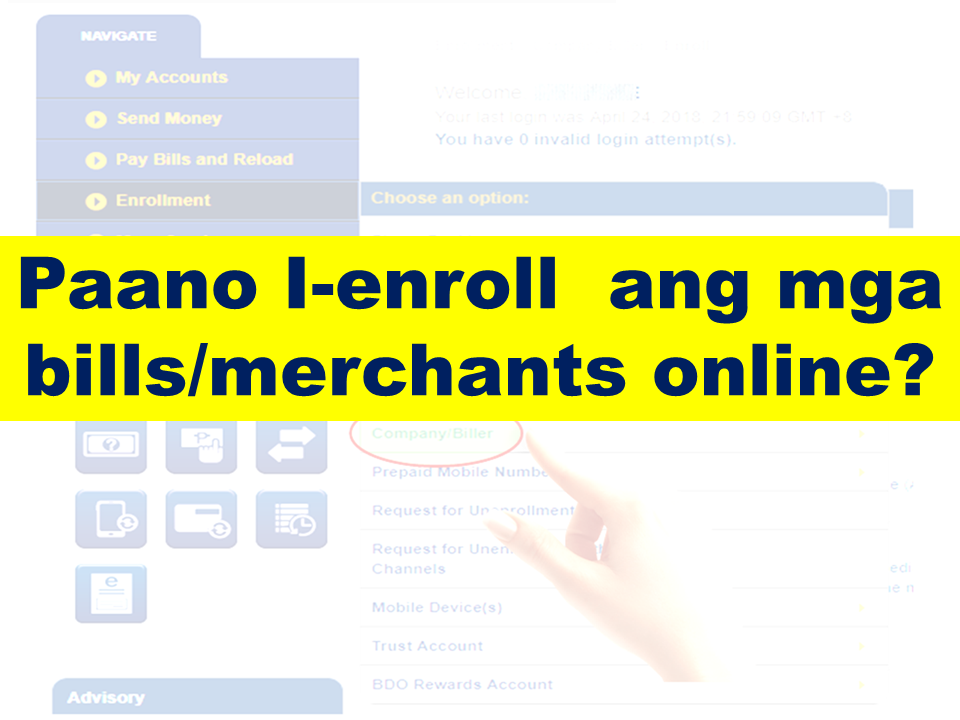
How do I enroll bills/merchants online? 
Do you have a BDO Account? Do you know that you can use it to pay your utility bills, credit card, loan amortizations and more?  Whether you want to pay your electric, telephone or water bill, you can now do it in the convenience of your own home. All you need is a working computer or a smartphone where you can have an internet access.  Advertisement         Sponsored Links        Which bills/merchants can I pay online?   There are over 300 billers you can pay through BDO Online Banking.     You can select from a complete list displayed in the drop-down menu located in the Bills Payment screen.        The cut-off time for immediate Bills Payments is 10pm.   All transactions made after the cut-off time and during weekends and holidays are subject to verification and will be considered transactions for the next banking day.       How do I enroll bills/merchants online?      To enroll a bill, select: Enrollment Services > Company/Biller > Enroll Enter the account number indicated in the bill as the subscriber number.   You can immediately pay your bills after enrollment.   The cut-off time for immediate Bills Payments is 10pm.   All transactions made after the cut-off time and during weekends and holidays are subject to verification and will be considered transactions for the next banking day.       How do I enroll my Meralco bill online?       To enroll Meralco, select: Enrollment Services > Company/Biller >           Enroll > Meralco       Enter the first 11 digits of the ATM/Phone Reference Number as the subscriber number. This is found in the lower left portion of your billing statement.         How do I pay Meralco bills?   Select Meralco in the drop-down list for "Pay this company/biller".      Enter the last 5 digits of the ATM/Phone Reference Number found on the lower left portion of your billing statement. Fill out the form and submit.       Note: System only accepts Meralco payments on or before the due date.       How do I pay billers/merchants that are not enrolled?     Click on "Pay a company/biller that is not yet enrolled".     Select any biller in the drop-down list after "Company/biller not requiring enrollment".   Enter the account number indicated on your billing statement as the subscriber number.   Fill out the form and submit.   You may also save this biller as an enrolled biller by Clicking on "Conforme".       How do I pay E-CENSUS (UNISYS) bills?     Select "E-CENSUS (UNISYS)" in your list of billers in the drop-down list for "Pay this company/biller".   This biller does not require enrollment.     Take note of the following when paying this biller:     1.) Enter the Total Amount Due when you are paying for all requests in a batch   2.) Enter the Amount Due to the request when you are paying for a particular request only   3.) Enter the Batch Request Number or Request Reference Number as the Subscriber No.   4.) Enter the Batch Request Number when you are paying for all requests in a batch   5.) Enter the Request Reference Number when you are paying for a particular request only     *Prior to confirming your payment, double-check the amount and the Subscriber Number that you entered against the e-Census document (Acknowledgement page/email/printout).    READ MORE: AFP Personnel To Get MRT Free Ride Starting April 25; Workers On Labor Day    Recruiters With Delisted, Banned, Suspended, Revoked And Cancelled POEA Licenses 2018    List of Philippine Embassies And Consulates Around The World    Classic Room Mates You Probably Living With   Do Not Be Fooled By Your Recruitment Agencies, Know Your  Correct Fees    Remittance Fees To Be Imposed On Kuwait Expats Expected To Bring $230 Million Income    TESDA Provides Training For Returning OFWs   Cash Aid To Be Given To Displaced OFWs From Kuwait—OWWA    Former OFW In Dubai Now Earning P25K A Week From Her Business    Top Search Engines In The Philippines For Finding Jobs Abroad    5 Signs A Person Is Going To Be Poor And 5 Signs You Are Going To Be Rich

To enroll a bill, select: Enrollment Services > Company/Biller > Enroll Enter the account number indicated in the bill as the subscriber number. 
You can immediately pay your bills after enrollment.
 The cut-off time for immediate Bills Payments is 10pm. 
All transactions made after the cut-off time and during weekends and holidays are subject to verification and will be considered transactions for the next banking day. 
Do you have a BDO Account? Do you know that you can use it to pay your utility bills, credit card, loan amortizations and more?  Whether you want to pay your electric, telephone or water bill, you can now do it in the convenience of your own home. All you need is a working computer or a smartphone where you can have an internet access.  Advertisement         Sponsored Links        Which bills/merchants can I pay online?   There are over 300 billers you can pay through BDO Online Banking.     You can select from a complete list displayed in the drop-down menu located in the Bills Payment screen.        The cut-off time for immediate Bills Payments is 10pm.   All transactions made after the cut-off time and during weekends and holidays are subject to verification and will be considered transactions for the next banking day.       How do I enroll bills/merchants online?      To enroll a bill, select: Enrollment Services > Company/Biller > Enroll Enter the account number indicated in the bill as the subscriber number.   You can immediately pay your bills after enrollment.   The cut-off time for immediate Bills Payments is 10pm.   All transactions made after the cut-off time and during weekends and holidays are subject to verification and will be considered transactions for the next banking day.       How do I enroll my Meralco bill online?       To enroll Meralco, select: Enrollment Services > Company/Biller >           Enroll > Meralco       Enter the first 11 digits of the ATM/Phone Reference Number as the subscriber number. This is found in the lower left portion of your billing statement.         How do I pay Meralco bills?   Select Meralco in the drop-down list for "Pay this company/biller".      Enter the last 5 digits of the ATM/Phone Reference Number found on the lower left portion of your billing statement. Fill out the form and submit.       Note: System only accepts Meralco payments on or before the due date.       How do I pay billers/merchants that are not enrolled?     Click on "Pay a company/biller that is not yet enrolled".     Select any biller in the drop-down list after "Company/biller not requiring enrollment".   Enter the account number indicated on your billing statement as the subscriber number.   Fill out the form and submit.   You may also save this biller as an enrolled biller by Clicking on "Conforme".       How do I pay E-CENSUS (UNISYS) bills?     Select "E-CENSUS (UNISYS)" in your list of billers in the drop-down list for "Pay this company/biller".   This biller does not require enrollment.     Take note of the following when paying this biller:     1.) Enter the Total Amount Due when you are paying for all requests in a batch   2.) Enter the Amount Due to the request when you are paying for a particular request only   3.) Enter the Batch Request Number or Request Reference Number as the Subscriber No.   4.) Enter the Batch Request Number when you are paying for all requests in a batch   5.) Enter the Request Reference Number when you are paying for a particular request only     *Prior to confirming your payment, double-check the amount and the Subscriber Number that you entered against the e-Census document (Acknowledgement page/email/printout).    READ MORE: AFP Personnel To Get MRT Free Ride Starting April 25; Workers On Labor Day    Recruiters With Delisted, Banned, Suspended, Revoked And Cancelled POEA Licenses 2018    List of Philippine Embassies And Consulates Around The World    Classic Room Mates You Probably Living With   Do Not Be Fooled By Your Recruitment Agencies, Know Your  Correct Fees    Remittance Fees To Be Imposed On Kuwait Expats Expected To Bring $230 Million Income    TESDA Provides Training For Returning OFWs   Cash Aid To Be Given To Displaced OFWs From Kuwait—OWWA    Former OFW In Dubai Now Earning P25K A Week From Her Business    Top Search Engines In The Philippines For Finding Jobs Abroad    5 Signs A Person Is Going To Be Poor And 5 Signs You Are Going To Be Rich

How do I enroll my Meralco bill online? 

Do you have a BDO Account? Do you know that you can use it to pay your utility bills, credit card, loan amortizations and more?  Whether you want to pay your electric, telephone or water bill, you can now do it in the convenience of your own home. All you need is a working computer or a smartphone where you can have an internet access.  Advertisement         Sponsored Links        Which bills/merchants can I pay online?   There are over 300 billers you can pay through BDO Online Banking.     You can select from a complete list displayed in the drop-down menu located in the Bills Payment screen.        The cut-off time for immediate Bills Payments is 10pm.   All transactions made after the cut-off time and during weekends and holidays are subject to verification and will be considered transactions for the next banking day.       How do I enroll bills/merchants online?      To enroll a bill, select: Enrollment Services > Company/Biller > Enroll Enter the account number indicated in the bill as the subscriber number.   You can immediately pay your bills after enrollment.   The cut-off time for immediate Bills Payments is 10pm.   All transactions made after the cut-off time and during weekends and holidays are subject to verification and will be considered transactions for the next banking day.       How do I enroll my Meralco bill online?       To enroll Meralco, select: Enrollment Services > Company/Biller >           Enroll > Meralco       Enter the first 11 digits of the ATM/Phone Reference Number as the subscriber number. This is found in the lower left portion of your billing statement.         How do I pay Meralco bills?   Select Meralco in the drop-down list for "Pay this company/biller".      Enter the last 5 digits of the ATM/Phone Reference Number found on the lower left portion of your billing statement. Fill out the form and submit.       Note: System only accepts Meralco payments on or before the due date.       How do I pay billers/merchants that are not enrolled?     Click on "Pay a company/biller that is not yet enrolled".     Select any biller in the drop-down list after "Company/biller not requiring enrollment".   Enter the account number indicated on your billing statement as the subscriber number.   Fill out the form and submit.   You may also save this biller as an enrolled biller by Clicking on "Conforme".       How do I pay E-CENSUS (UNISYS) bills?     Select "E-CENSUS (UNISYS)" in your list of billers in the drop-down list for "Pay this company/biller".   This biller does not require enrollment.     Take note of the following when paying this biller:     1.) Enter the Total Amount Due when you are paying for all requests in a batch   2.) Enter the Amount Due to the request when you are paying for a particular request only   3.) Enter the Batch Request Number or Request Reference Number as the Subscriber No.   4.) Enter the Batch Request Number when you are paying for all requests in a batch   5.) Enter the Request Reference Number when you are paying for a particular request only     *Prior to confirming your payment, double-check the amount and the Subscriber Number that you entered against the e-Census document (Acknowledgement page/email/printout).    READ MORE: AFP Personnel To Get MRT Free Ride Starting April 25; Workers On Labor Day    Recruiters With Delisted, Banned, Suspended, Revoked And Cancelled POEA Licenses 2018    List of Philippine Embassies And Consulates Around The World    Classic Room Mates You Probably Living With   Do Not Be Fooled By Your Recruitment Agencies, Know Your  Correct Fees    Remittance Fees To Be Imposed On Kuwait Expats Expected To Bring $230 Million Income    TESDA Provides Training For Returning OFWs   Cash Aid To Be Given To Displaced OFWs From Kuwait—OWWA    Former OFW In Dubai Now Earning P25K A Week From Her Business    Top Search Engines In The Philippines For Finding Jobs Abroad    5 Signs A Person Is Going To Be Poor And 5 Signs You Are Going To Be Rich
To enroll Meralco, select: Enrollment Services > Company/Biller > 


Do you have a BDO Account? Do you know that you can use it to pay your utility bills, credit card, loan amortizations and more?  Whether you want to pay your electric, telephone or water bill, you can now do it in the convenience of your own home. All you need is a working computer or a smartphone where you can have an internet access.  Advertisement         Sponsored Links        Which bills/merchants can I pay online?   There are over 300 billers you can pay through BDO Online Banking.     You can select from a complete list displayed in the drop-down menu located in the Bills Payment screen.        The cut-off time for immediate Bills Payments is 10pm.   All transactions made after the cut-off time and during weekends and holidays are subject to verification and will be considered transactions for the next banking day.       How do I enroll bills/merchants online?      To enroll a bill, select: Enrollment Services > Company/Biller > Enroll Enter the account number indicated in the bill as the subscriber number.   You can immediately pay your bills after enrollment.   The cut-off time for immediate Bills Payments is 10pm.   All transactions made after the cut-off time and during weekends and holidays are subject to verification and will be considered transactions for the next banking day.       How do I enroll my Meralco bill online?       To enroll Meralco, select: Enrollment Services > Company/Biller >           Enroll > Meralco       Enter the first 11 digits of the ATM/Phone Reference Number as the subscriber number. This is found in the lower left portion of your billing statement.         How do I pay Meralco bills?   Select Meralco in the drop-down list for "Pay this company/biller".      Enter the last 5 digits of the ATM/Phone Reference Number found on the lower left portion of your billing statement. Fill out the form and submit.       Note: System only accepts Meralco payments on or before the due date.       How do I pay billers/merchants that are not enrolled?     Click on "Pay a company/biller that is not yet enrolled".     Select any biller in the drop-down list after "Company/biller not requiring enrollment".   Enter the account number indicated on your billing statement as the subscriber number.   Fill out the form and submit.   You may also save this biller as an enrolled biller by Clicking on "Conforme".       How do I pay E-CENSUS (UNISYS) bills?     Select "E-CENSUS (UNISYS)" in your list of billers in the drop-down list for "Pay this company/biller".   This biller does not require enrollment.     Take note of the following when paying this biller:     1.) Enter the Total Amount Due when you are paying for all requests in a batch   2.) Enter the Amount Due to the request when you are paying for a particular request only   3.) Enter the Batch Request Number or Request Reference Number as the Subscriber No.   4.) Enter the Batch Request Number when you are paying for all requests in a batch   5.) Enter the Request Reference Number when you are paying for a particular request only     *Prior to confirming your payment, double-check the amount and the Subscriber Number that you entered against the e-Census document (Acknowledgement page/email/printout).    READ MORE: AFP Personnel To Get MRT Free Ride Starting April 25; Workers On Labor Day    Recruiters With Delisted, Banned, Suspended, Revoked And Cancelled POEA Licenses 2018    List of Philippine Embassies And Consulates Around The World    Classic Room Mates You Probably Living With   Do Not Be Fooled By Your Recruitment Agencies, Know Your  Correct Fees    Remittance Fees To Be Imposed On Kuwait Expats Expected To Bring $230 Million Income    TESDA Provides Training For Returning OFWs   Cash Aid To Be Given To Displaced OFWs From Kuwait—OWWA    Former OFW In Dubai Now Earning P25K A Week From Her Business    Top Search Engines In The Philippines For Finding Jobs Abroad    5 Signs A Person Is Going To Be Poor And 5 Signs You Are Going To Be Rich

Enroll > Meralco 
Do you have a BDO Account? Do you know that you can use it to pay your utility bills, credit card, loan amortizations and more?  Whether you want to pay your electric, telephone or water bill, you can now do it in the convenience of your own home. All you need is a working computer or a smartphone where you can have an internet access.  Advertisement         Sponsored Links        Which bills/merchants can I pay online?   There are over 300 billers you can pay through BDO Online Banking.     You can select from a complete list displayed in the drop-down menu located in the Bills Payment screen.        The cut-off time for immediate Bills Payments is 10pm.   All transactions made after the cut-off time and during weekends and holidays are subject to verification and will be considered transactions for the next banking day.       How do I enroll bills/merchants online?      To enroll a bill, select: Enrollment Services > Company/Biller > Enroll Enter the account number indicated in the bill as the subscriber number.   You can immediately pay your bills after enrollment.   The cut-off time for immediate Bills Payments is 10pm.   All transactions made after the cut-off time and during weekends and holidays are subject to verification and will be considered transactions for the next banking day.       How do I enroll my Meralco bill online?       To enroll Meralco, select: Enrollment Services > Company/Biller >           Enroll > Meralco       Enter the first 11 digits of the ATM/Phone Reference Number as the subscriber number. This is found in the lower left portion of your billing statement.         How do I pay Meralco bills?   Select Meralco in the drop-down list for "Pay this company/biller".      Enter the last 5 digits of the ATM/Phone Reference Number found on the lower left portion of your billing statement. Fill out the form and submit.       Note: System only accepts Meralco payments on or before the due date.       How do I pay billers/merchants that are not enrolled?     Click on "Pay a company/biller that is not yet enrolled".     Select any biller in the drop-down list after "Company/biller not requiring enrollment".   Enter the account number indicated on your billing statement as the subscriber number.   Fill out the form and submit.   You may also save this biller as an enrolled biller by Clicking on "Conforme".       How do I pay E-CENSUS (UNISYS) bills?     Select "E-CENSUS (UNISYS)" in your list of billers in the drop-down list for "Pay this company/biller".   This biller does not require enrollment.     Take note of the following when paying this biller:     1.) Enter the Total Amount Due when you are paying for all requests in a batch   2.) Enter the Amount Due to the request when you are paying for a particular request only   3.) Enter the Batch Request Number or Request Reference Number as the Subscriber No.   4.) Enter the Batch Request Number when you are paying for all requests in a batch   5.) Enter the Request Reference Number when you are paying for a particular request only     *Prior to confirming your payment, double-check the amount and the Subscriber Number that you entered against the e-Census document (Acknowledgement page/email/printout).    READ MORE: AFP Personnel To Get MRT Free Ride Starting April 25; Workers On Labor Day    Recruiters With Delisted, Banned, Suspended, Revoked And Cancelled POEA Licenses 2018    List of Philippine Embassies And Consulates Around The World    Classic Room Mates You Probably Living With   Do Not Be Fooled By Your Recruitment Agencies, Know Your  Correct Fees    Remittance Fees To Be Imposed On Kuwait Expats Expected To Bring $230 Million Income    TESDA Provides Training For Returning OFWs   Cash Aid To Be Given To Displaced OFWs From Kuwait—OWWA    Former OFW In Dubai Now Earning P25K A Week From Her Business    Top Search Engines In The Philippines For Finding Jobs Abroad    5 Signs A Person Is Going To Be Poor And 5 Signs You Are Going To Be Rich

Enter the first 11 digits of the ATM/Phone Reference Number as the subscriber number. This is found in the lower left portion of your billing statement. 


Do you have a BDO Account? Do you know that you can use it to pay your utility bills, credit card, loan amortizations and more?  Whether you want to pay your electric, telephone or water bill, you can now do it in the convenience of your own home. All you need is a working computer or a smartphone where you can have an internet access.  Advertisement         Sponsored Links        Which bills/merchants can I pay online?   There are over 300 billers you can pay through BDO Online Banking.     You can select from a complete list displayed in the drop-down menu located in the Bills Payment screen.        The cut-off time for immediate Bills Payments is 10pm.   All transactions made after the cut-off time and during weekends and holidays are subject to verification and will be considered transactions for the next banking day.       How do I enroll bills/merchants online?      To enroll a bill, select: Enrollment Services > Company/Biller > Enroll Enter the account number indicated in the bill as the subscriber number.   You can immediately pay your bills after enrollment.   The cut-off time for immediate Bills Payments is 10pm.   All transactions made after the cut-off time and during weekends and holidays are subject to verification and will be considered transactions for the next banking day.       How do I enroll my Meralco bill online?       To enroll Meralco, select: Enrollment Services > Company/Biller >           Enroll > Meralco       Enter the first 11 digits of the ATM/Phone Reference Number as the subscriber number. This is found in the lower left portion of your billing statement.         How do I pay Meralco bills?   Select Meralco in the drop-down list for "Pay this company/biller".      Enter the last 5 digits of the ATM/Phone Reference Number found on the lower left portion of your billing statement. Fill out the form and submit.       Note: System only accepts Meralco payments on or before the due date.       How do I pay billers/merchants that are not enrolled?     Click on "Pay a company/biller that is not yet enrolled".     Select any biller in the drop-down list after "Company/biller not requiring enrollment".   Enter the account number indicated on your billing statement as the subscriber number.   Fill out the form and submit.   You may also save this biller as an enrolled biller by Clicking on "Conforme".       How do I pay E-CENSUS (UNISYS) bills?     Select "E-CENSUS (UNISYS)" in your list of billers in the drop-down list for "Pay this company/biller".   This biller does not require enrollment.     Take note of the following when paying this biller:     1.) Enter the Total Amount Due when you are paying for all requests in a batch   2.) Enter the Amount Due to the request when you are paying for a particular request only   3.) Enter the Batch Request Number or Request Reference Number as the Subscriber No.   4.) Enter the Batch Request Number when you are paying for all requests in a batch   5.) Enter the Request Reference Number when you are paying for a particular request only     *Prior to confirming your payment, double-check the amount and the Subscriber Number that you entered against the e-Census document (Acknowledgement page/email/printout).    READ MORE: AFP Personnel To Get MRT Free Ride Starting April 25; Workers On Labor Day    Recruiters With Delisted, Banned, Suspended, Revoked And Cancelled POEA Licenses 2018    List of Philippine Embassies And Consulates Around The World    Classic Room Mates You Probably Living With   Do Not Be Fooled By Your Recruitment Agencies, Know Your  Correct Fees    Remittance Fees To Be Imposed On Kuwait Expats Expected To Bring $230 Million Income    TESDA Provides Training For Returning OFWs   Cash Aid To Be Given To Displaced OFWs From Kuwait—OWWA    Former OFW In Dubai Now Earning P25K A Week From Her Business    Top Search Engines In The Philippines For Finding Jobs Abroad    5 Signs A Person Is Going To Be Poor And 5 Signs You Are Going To Be Rich

How do I pay Meralco bills? 
Select Meralco in the drop-down list for "Pay this company/biller". 
Do you have a BDO Account? Do you know that you can use it to pay your utility bills, credit card, loan amortizations and more?  Whether you want to pay your electric, telephone or water bill, you can now do it in the convenience of your own home. All you need is a working computer or a smartphone where you can have an internet access.  Advertisement         Sponsored Links        Which bills/merchants can I pay online?   There are over 300 billers you can pay through BDO Online Banking.     You can select from a complete list displayed in the drop-down menu located in the Bills Payment screen.        The cut-off time for immediate Bills Payments is 10pm.   All transactions made after the cut-off time and during weekends and holidays are subject to verification and will be considered transactions for the next banking day.       How do I enroll bills/merchants online?      To enroll a bill, select: Enrollment Services > Company/Biller > Enroll Enter the account number indicated in the bill as the subscriber number.   You can immediately pay your bills after enrollment.   The cut-off time for immediate Bills Payments is 10pm.   All transactions made after the cut-off time and during weekends and holidays are subject to verification and will be considered transactions for the next banking day.       How do I enroll my Meralco bill online?       To enroll Meralco, select: Enrollment Services > Company/Biller >           Enroll > Meralco       Enter the first 11 digits of the ATM/Phone Reference Number as the subscriber number. This is found in the lower left portion of your billing statement.         How do I pay Meralco bills?   Select Meralco in the drop-down list for "Pay this company/biller".      Enter the last 5 digits of the ATM/Phone Reference Number found on the lower left portion of your billing statement. Fill out the form and submit.       Note: System only accepts Meralco payments on or before the due date.       How do I pay billers/merchants that are not enrolled?     Click on "Pay a company/biller that is not yet enrolled".     Select any biller in the drop-down list after "Company/biller not requiring enrollment".   Enter the account number indicated on your billing statement as the subscriber number.   Fill out the form and submit.   You may also save this biller as an enrolled biller by Clicking on "Conforme".       How do I pay E-CENSUS (UNISYS) bills?     Select "E-CENSUS (UNISYS)" in your list of billers in the drop-down list for "Pay this company/biller".   This biller does not require enrollment.     Take note of the following when paying this biller:     1.) Enter the Total Amount Due when you are paying for all requests in a batch   2.) Enter the Amount Due to the request when you are paying for a particular request only   3.) Enter the Batch Request Number or Request Reference Number as the Subscriber No.   4.) Enter the Batch Request Number when you are paying for all requests in a batch   5.) Enter the Request Reference Number when you are paying for a particular request only     *Prior to confirming your payment, double-check the amount and the Subscriber Number that you entered against the e-Census document (Acknowledgement page/email/printout).    READ MORE: AFP Personnel To Get MRT Free Ride Starting April 25; Workers On Labor Day    Recruiters With Delisted, Banned, Suspended, Revoked And Cancelled POEA Licenses 2018    List of Philippine Embassies And Consulates Around The World    Classic Room Mates You Probably Living With   Do Not Be Fooled By Your Recruitment Agencies, Know Your  Correct Fees    Remittance Fees To Be Imposed On Kuwait Expats Expected To Bring $230 Million Income    TESDA Provides Training For Returning OFWs   Cash Aid To Be Given To Displaced OFWs From Kuwait—OWWA    Former OFW In Dubai Now Earning P25K A Week From Her Business    Top Search Engines In The Philippines For Finding Jobs Abroad    5 Signs A Person Is Going To Be Poor And 5 Signs You Are Going To Be Rich

Enter the last 5 digits of the ATM/Phone Reference Number found on the lower left portion of your billing statement. Fill out the form and submit. 
Do you have a BDO Account? Do you know that you can use it to pay your utility bills, credit card, loan amortizations and more?  Whether you want to pay your electric, telephone or water bill, you can now do it in the convenience of your own home. All you need is a working computer or a smartphone where you can have an internet access.  Advertisement         Sponsored Links        Which bills/merchants can I pay online?   There are over 300 billers you can pay through BDO Online Banking.     You can select from a complete list displayed in the drop-down menu located in the Bills Payment screen.        The cut-off time for immediate Bills Payments is 10pm.   All transactions made after the cut-off time and during weekends and holidays are subject to verification and will be considered transactions for the next banking day.       How do I enroll bills/merchants online?      To enroll a bill, select: Enrollment Services > Company/Biller > Enroll Enter the account number indicated in the bill as the subscriber number.   You can immediately pay your bills after enrollment.   The cut-off time for immediate Bills Payments is 10pm.   All transactions made after the cut-off time and during weekends and holidays are subject to verification and will be considered transactions for the next banking day.       How do I enroll my Meralco bill online?       To enroll Meralco, select: Enrollment Services > Company/Biller >           Enroll > Meralco       Enter the first 11 digits of the ATM/Phone Reference Number as the subscriber number. This is found in the lower left portion of your billing statement.         How do I pay Meralco bills?   Select Meralco in the drop-down list for "Pay this company/biller".      Enter the last 5 digits of the ATM/Phone Reference Number found on the lower left portion of your billing statement. Fill out the form and submit.       Note: System only accepts Meralco payments on or before the due date.       How do I pay billers/merchants that are not enrolled?     Click on "Pay a company/biller that is not yet enrolled".     Select any biller in the drop-down list after "Company/biller not requiring enrollment".   Enter the account number indicated on your billing statement as the subscriber number.   Fill out the form and submit.   You may also save this biller as an enrolled biller by Clicking on "Conforme".       How do I pay E-CENSUS (UNISYS) bills?     Select "E-CENSUS (UNISYS)" in your list of billers in the drop-down list for "Pay this company/biller".   This biller does not require enrollment.     Take note of the following when paying this biller:     1.) Enter the Total Amount Due when you are paying for all requests in a batch   2.) Enter the Amount Due to the request when you are paying for a particular request only   3.) Enter the Batch Request Number or Request Reference Number as the Subscriber No.   4.) Enter the Batch Request Number when you are paying for all requests in a batch   5.) Enter the Request Reference Number when you are paying for a particular request only     *Prior to confirming your payment, double-check the amount and the Subscriber Number that you entered against the e-Census document (Acknowledgement page/email/printout).    READ MORE: AFP Personnel To Get MRT Free Ride Starting April 25; Workers On Labor Day    Recruiters With Delisted, Banned, Suspended, Revoked And Cancelled POEA Licenses 2018    List of Philippine Embassies And Consulates Around The World    Classic Room Mates You Probably Living With   Do Not Be Fooled By Your Recruitment Agencies, Know Your  Correct Fees    Remittance Fees To Be Imposed On Kuwait Expats Expected To Bring $230 Million Income    TESDA Provides Training For Returning OFWs   Cash Aid To Be Given To Displaced OFWs From Kuwait—OWWA    Former OFW In Dubai Now Earning P25K A Week From Her Business    Top Search Engines In The Philippines For Finding Jobs Abroad    5 Signs A Person Is Going To Be Poor And 5 Signs You Are Going To Be Rich

Note: System only accepts Meralco payments on or before the due date.
Do you have a BDO Account? Do you know that you can use it to pay your utility bills, credit card, loan amortizations and more?  Whether you want to pay your electric, telephone or water bill, you can now do it in the convenience of your own home. All you need is a working computer or a smartphone where you can have an internet access.  Advertisement         Sponsored Links        Which bills/merchants can I pay online?   There are over 300 billers you can pay through BDO Online Banking.     You can select from a complete list displayed in the drop-down menu located in the Bills Payment screen.        The cut-off time for immediate Bills Payments is 10pm.   All transactions made after the cut-off time and during weekends and holidays are subject to verification and will be considered transactions for the next banking day.       How do I enroll bills/merchants online?      To enroll a bill, select: Enrollment Services > Company/Biller > Enroll Enter the account number indicated in the bill as the subscriber number.   You can immediately pay your bills after enrollment.   The cut-off time for immediate Bills Payments is 10pm.   All transactions made after the cut-off time and during weekends and holidays are subject to verification and will be considered transactions for the next banking day.       How do I enroll my Meralco bill online?       To enroll Meralco, select: Enrollment Services > Company/Biller >           Enroll > Meralco       Enter the first 11 digits of the ATM/Phone Reference Number as the subscriber number. This is found in the lower left portion of your billing statement.         How do I pay Meralco bills?   Select Meralco in the drop-down list for "Pay this company/biller".      Enter the last 5 digits of the ATM/Phone Reference Number found on the lower left portion of your billing statement. Fill out the form and submit.       Note: System only accepts Meralco payments on or before the due date.       How do I pay billers/merchants that are not enrolled?     Click on "Pay a company/biller that is not yet enrolled".     Select any biller in the drop-down list after "Company/biller not requiring enrollment".   Enter the account number indicated on your billing statement as the subscriber number.   Fill out the form and submit.   You may also save this biller as an enrolled biller by Clicking on "Conforme".       How do I pay E-CENSUS (UNISYS) bills?     Select "E-CENSUS (UNISYS)" in your list of billers in the drop-down list for "Pay this company/biller".   This biller does not require enrollment.     Take note of the following when paying this biller:     1.) Enter the Total Amount Due when you are paying for all requests in a batch   2.) Enter the Amount Due to the request when you are paying for a particular request only   3.) Enter the Batch Request Number or Request Reference Number as the Subscriber No.   4.) Enter the Batch Request Number when you are paying for all requests in a batch   5.) Enter the Request Reference Number when you are paying for a particular request only     *Prior to confirming your payment, double-check the amount and the Subscriber Number that you entered against the e-Census document (Acknowledgement page/email/printout).    READ MORE: AFP Personnel To Get MRT Free Ride Starting April 25; Workers On Labor Day    Recruiters With Delisted, Banned, Suspended, Revoked And Cancelled POEA Licenses 2018    List of Philippine Embassies And Consulates Around The World    Classic Room Mates You Probably Living With   Do Not Be Fooled By Your Recruitment Agencies, Know Your  Correct Fees    Remittance Fees To Be Imposed On Kuwait Expats Expected To Bring $230 Million Income    TESDA Provides Training For Returning OFWs   Cash Aid To Be Given To Displaced OFWs From Kuwait—OWWA    Former OFW In Dubai Now Earning P25K A Week From Her Business    Top Search Engines In The Philippines For Finding Jobs Abroad    5 Signs A Person Is Going To Be Poor And 5 Signs You Are Going To Be Rich

 How do I pay billers/merchants that are not enrolled? 

Click on "Pay a company/biller that is not yet enrolled". 

Select any biller in the drop-down list after "Company/biller not requiring enrollment". 
Enter the account number indicated on your billing statement as the subscriber number. 
Fill out the form and submit. 
You may also save this biller as an enrolled biller by Clicking on "Conforme". 
Do you have a BDO Account? Do you know that you can use it to pay your utility bills, credit card, loan amortizations and more?  Whether you want to pay your electric, telephone or water bill, you can now do it in the convenience of your own home. All you need is a working computer or a smartphone where you can have an internet access.  Advertisement         Sponsored Links        Which bills/merchants can I pay online?   There are over 300 billers you can pay through BDO Online Banking.     You can select from a complete list displayed in the drop-down menu located in the Bills Payment screen.        The cut-off time for immediate Bills Payments is 10pm.   All transactions made after the cut-off time and during weekends and holidays are subject to verification and will be considered transactions for the next banking day.       How do I enroll bills/merchants online?      To enroll a bill, select: Enrollment Services > Company/Biller > Enroll Enter the account number indicated in the bill as the subscriber number.   You can immediately pay your bills after enrollment.   The cut-off time for immediate Bills Payments is 10pm.   All transactions made after the cut-off time and during weekends and holidays are subject to verification and will be considered transactions for the next banking day.       How do I enroll my Meralco bill online?       To enroll Meralco, select: Enrollment Services > Company/Biller >           Enroll > Meralco       Enter the first 11 digits of the ATM/Phone Reference Number as the subscriber number. This is found in the lower left portion of your billing statement.         How do I pay Meralco bills?   Select Meralco in the drop-down list for "Pay this company/biller".      Enter the last 5 digits of the ATM/Phone Reference Number found on the lower left portion of your billing statement. Fill out the form and submit.       Note: System only accepts Meralco payments on or before the due date.       How do I pay billers/merchants that are not enrolled?     Click on "Pay a company/biller that is not yet enrolled".     Select any biller in the drop-down list after "Company/biller not requiring enrollment".   Enter the account number indicated on your billing statement as the subscriber number.   Fill out the form and submit.   You may also save this biller as an enrolled biller by Clicking on "Conforme".       How do I pay E-CENSUS (UNISYS) bills?     Select "E-CENSUS (UNISYS)" in your list of billers in the drop-down list for "Pay this company/biller".   This biller does not require enrollment.     Take note of the following when paying this biller:     1.) Enter the Total Amount Due when you are paying for all requests in a batch   2.) Enter the Amount Due to the request when you are paying for a particular request only   3.) Enter the Batch Request Number or Request Reference Number as the Subscriber No.   4.) Enter the Batch Request Number when you are paying for all requests in a batch   5.) Enter the Request Reference Number when you are paying for a particular request only     *Prior to confirming your payment, double-check the amount and the Subscriber Number that you entered against the e-Census document (Acknowledgement page/email/printout).    READ MORE: AFP Personnel To Get MRT Free Ride Starting April 25; Workers On Labor Day    Recruiters With Delisted, Banned, Suspended, Revoked And Cancelled POEA Licenses 2018    List of Philippine Embassies And Consulates Around The World    Classic Room Mates You Probably Living With   Do Not Be Fooled By Your Recruitment Agencies, Know Your  Correct Fees    Remittance Fees To Be Imposed On Kuwait Expats Expected To Bring $230 Million Income    TESDA Provides Training For Returning OFWs   Cash Aid To Be Given To Displaced OFWs From Kuwait—OWWA    Former OFW In Dubai Now Earning P25K A Week From Her Business    Top Search Engines In The Philippines For Finding Jobs Abroad    5 Signs A Person Is Going To Be Poor And 5 Signs You Are Going To Be Rich

How do I pay E-CENSUS (UNISYS) bills? 

Select "E-CENSUS (UNISYS)" in your list of billers in the drop-down list for "Pay this company/biller". 
This biller does not require enrollment. 

Take note of the following when paying this biller: 
Do you have a BDO Account? Do you know that you can use it to pay your utility bills, credit card, loan amortizations and more?  Whether you want to pay your electric, telephone or water bill, you can now do it in the convenience of your own home. All you need is a working computer or a smartphone where you can have an internet access.  Advertisement         Sponsored Links        Which bills/merchants can I pay online?   There are over 300 billers you can pay through BDO Online Banking.     You can select from a complete list displayed in the drop-down menu located in the Bills Payment screen.        The cut-off time for immediate Bills Payments is 10pm.   All transactions made after the cut-off time and during weekends and holidays are subject to verification and will be considered transactions for the next banking day.       How do I enroll bills/merchants online?      To enroll a bill, select: Enrollment Services > Company/Biller > Enroll Enter the account number indicated in the bill as the subscriber number.   You can immediately pay your bills after enrollment.   The cut-off time for immediate Bills Payments is 10pm.   All transactions made after the cut-off time and during weekends and holidays are subject to verification and will be considered transactions for the next banking day.       How do I enroll my Meralco bill online?       To enroll Meralco, select: Enrollment Services > Company/Biller >           Enroll > Meralco       Enter the first 11 digits of the ATM/Phone Reference Number as the subscriber number. This is found in the lower left portion of your billing statement.         How do I pay Meralco bills?   Select Meralco in the drop-down list for "Pay this company/biller".      Enter the last 5 digits of the ATM/Phone Reference Number found on the lower left portion of your billing statement. Fill out the form and submit.       Note: System only accepts Meralco payments on or before the due date.       How do I pay billers/merchants that are not enrolled?     Click on "Pay a company/biller that is not yet enrolled".     Select any biller in the drop-down list after "Company/biller not requiring enrollment".   Enter the account number indicated on your billing statement as the subscriber number.   Fill out the form and submit.   You may also save this biller as an enrolled biller by Clicking on "Conforme".       How do I pay E-CENSUS (UNISYS) bills?     Select "E-CENSUS (UNISYS)" in your list of billers in the drop-down list for "Pay this company/biller".   This biller does not require enrollment.     Take note of the following when paying this biller:     1.) Enter the Total Amount Due when you are paying for all requests in a batch   2.) Enter the Amount Due to the request when you are paying for a particular request only   3.) Enter the Batch Request Number or Request Reference Number as the Subscriber No.   4.) Enter the Batch Request Number when you are paying for all requests in a batch   5.) Enter the Request Reference Number when you are paying for a particular request only     *Prior to confirming your payment, double-check the amount and the Subscriber Number that you entered against the e-Census document (Acknowledgement page/email/printout).    READ MORE: AFP Personnel To Get MRT Free Ride Starting April 25; Workers On Labor Day    Recruiters With Delisted, Banned, Suspended, Revoked And Cancelled POEA Licenses 2018    List of Philippine Embassies And Consulates Around The World    Classic Room Mates You Probably Living With   Do Not Be Fooled By Your Recruitment Agencies, Know Your  Correct Fees    Remittance Fees To Be Imposed On Kuwait Expats Expected To Bring $230 Million Income    TESDA Provides Training For Returning OFWs   Cash Aid To Be Given To Displaced OFWs From Kuwait—OWWA    Former OFW In Dubai Now Earning P25K A Week From Her Business    Top Search Engines In The Philippines For Finding Jobs Abroad    5 Signs A Person Is Going To Be Poor And 5 Signs You Are Going To Be Rich
1.) Enter the Total Amount Due when you are paying for all requests in a batch 
2.) Enter the Amount Due to the request when you are paying for a particular request only 
3.) Enter the Batch Request Number or Request Reference Number as the Subscriber No. 
4.) Enter the Batch Request Number when you are paying for all requests in a batch 
5.) Enter the Request Reference Number when you are paying for a particular request only 

*Before confirming your payment, double-check the amount and the Subscriber Number that you entered against the e-Census document (Acknowledgement page/email/printout).


©2018 THOUGHTSKOTO