Carousel

Sponsored Links

Looking for House and Lot Within Tagaytay Area? CONTACT US!

Name

Email *

Message *

Showing posts with label internet access. Show all posts

Wednesday, September 05, 2018

Can You File Charges Against Your Social Media Basher?

In this era where everyone has their own smartphones and ready internet access through free wifi hotspots everywhere, we can all have access to important pieces of information. However, we are also vulnerable to things like stalking and cyberbullying. Like physical or verbal bullying which happens face to face, cyberbullying leaves ill feeling to the victim which oftentimes leads to low self-esteem and depression.
Can we do something about it? Can we file charges to these social media bashers?
In this era where everyone has their own smartphone and ready internet access through free wifi hotspots everywhere, we can all have access to important pieces of information. However, we are also vulnerable to things like stalking and cyberbullying. Like physical or verbal bullying which happens face to face, cyberbullying leaves ill feeling to the victim which oftentimes leads to low self-esteem and depression.  Can we do something about it? Can we file charges to these social media bashers?      Ads    Cyberbullying is bullying that takes place over digital devices like smartphones, computers, and tablets. It can occur through text, or online in social media, forums, or gaming where people can view, participate or share content. It includes sending, posting, or sharing a negative, harmful, or false comment about someone which includes sharing personal or private information about the victim which causes embarrassment or humiliation. It can even cross the line into an unlawful or criminal act.   Can anyone be jailed for bullying?  Although there are existing laws on bullying in schools which protects the elementary and secondary students from physical verbal or electronic bullying, there are still no existing laws against cyberbullying outside schools and among adults.    RA10627 or the anti-bullying act of 2013 only covers bullying which happens within the school premises and the discretion of penalties depends on the policy of the school and they are merely administrative actions at the school administrations end.  Although there is an existing law against cyber libel or crimes committed using the internet or computer systems but bullying is not among them.   Social media is known to be a breeding ground for cyber bullies. They become more ferocious online due to anonymity and they can change everything about them providing them shield from their victims.   Cyberbullying is dangerous. It can cause depression among the victims. In some cases, bullying using social media or the internet could cause the victims to commit suicide.    Can you do anything about it?  If you think that a post or comment on social media is affecting you like bullying, you can always hit the report button. You can also take a screenshot of the post and show it to the principal of the school and let them do the necessary reprimand against the offender.   If the act can be proved as cyber libel, it can be punishable by 12years imprisonment, but it has to be proven accordingly.   As parents, especially overseas Filipino workers who are not physically present with your children, you must be aware of the forms of cyberbullying that might already be affecting your kids.  Even miles away, you should make sure that you monitor your kids' activities online just by talking to them and asking them.  Filed under the category of depression, free wifi hotspots, information, internet access, low self-esteem, social media bashers
Ads


Top 5 Cybercrime Complaint in the Philippines

Cyberbullying is bullying that takes place over digital devices like smartphones, computers, and tablets. It can occur through text, or online in social media, forums, or gaming where people can view, participate or share content. It includes sending, posting, or sharing a negative, harmful, or false comment about someone which includes sharing personal or private information about the victim which causes embarrassment or humiliation. It can even cross the line into an unlawful or criminal act.

Can anyone be jailed for bullying?
Although there are existing laws on bullying in schools which protects the elementary and secondary students from physical verbal or electronic bullying, there are still no existing laws against cyberbullying outside schools and among adults.

 RA10627 or the anti-bullying act of 2013 only covers bullying which happens within the school premises and the discretion of penalties depends on the policy of the school and they are merely administrative actions at the school administrations end.
Although there is an existing law against cyber libel or crimes committed using the internet or computer systems but bullying is not among them.

Social media is known to be a breeding ground for cyber bullies. They become more ferocious online due to anonymity and they can change everything about them providing them shield from their victims.

Cyberbullying is dangerous. It can cause depression among the victims. In some cases, bullying using social media or the internet could cause the victims to commit suicide. 

Can you do anything about it?
If you think that a post or comment on social media is affecting you like bullying, you can always hit the report button. You can also take a screenshot of the post and show it to the principal of the school and let them do the necessary reprimand against the offender. 
If the act can be proved as cyber libel, it can be punishable by 12 years imprisonment, but it has to be proven accordingly.

As parents, especially overseas Filipino workers who are not physically present with your children, you must be aware of the forms of cyberbullying that might already be affecting your kids.
Even miles away, you should make sure that you monitor your kids' activities online just by talking to them and asking them.
Filed under the category of depression, free wifi hotspots, information, internet access, low self-esteem, social media bashers 

Ads

Protection of Public Safety for Peace and Order


Graphics source here

Read More:
The remittances coming from overseas Filipino workers (OFWs) helps the Philippine economy on its feet for decades. Because many Filipinos count on their relatives or family member working abroad for their monthly expenses, particularly those who are working in Saudi Arabia, was worried about a recent news that the Saudi Arabian government will impose taxes on remittances sent by expatriates including thousands of OFWs in the Gulf region.      Ads     Sponsored Links       The Ministry of Finance has denied rumors with regard to the imposition of fees on remittance by foreign workers.   “Referring to what has been circulated by some media about the proposal to impose fees on remittance by foreign workers, the Ministry of Finance categorically denies this and affirms the commitment to support the free movement of capital through official channels in accordance with the best international standards and practices,” the ministry said in a statement carried by the Saudi Press Agency.  The statement noted that the ministry aims by this to boost investor confidence in the economy and achieve further growth of the economy within the framework of the Kingdom’s Vision 2030 so as to enhance the competitiveness of the economy and its attractiveness to foreign investments.  It is to be noted that the ministry spokesman had denied in January 2017 a similar report about the move to impose a fee on foreign remittance.

Wednesday, April 25, 2018

How Do You Pay Your Electric, Water, Phone And Other Bills Using BDO Online?

Do you have a BDO Account? Do you know that you can use it to pay your utility bills, credit card, loan amortizations and more?
Whether you want to pay your electric, telephone or water bill, you can now do it in the convenience of your own home. All you need is a working computer or a smartphone where you can have an internet access.
Advertisement


Do you have a BDO Account? Do you know that you can use it to pay your utility bills, credit card, loan amortizations and more?  Whether you want to pay your electric, telephone or water bill, you can now do it in the convenience of your own home. All you need is a working computer or a smartphone where you can have an internet access.  Advertisement         Sponsored Links        Which bills/merchants can I pay online?   There are over 300 billers you can pay through BDO Online Banking.     You can select from a complete list displayed in the drop-down menu located in the Bills Payment screen.        The cut-off time for immediate Bills Payments is 10pm.   All transactions made after the cut-off time and during weekends and holidays are subject to verification and will be considered transactions for the next banking day.       How do I enroll bills/merchants online?      To enroll a bill, select: Enrollment Services > Company/Biller > Enroll Enter the account number indicated in the bill as the subscriber number.   You can immediately pay your bills after enrollment.   The cut-off time for immediate Bills Payments is 10pm.   All transactions made after the cut-off time and during weekends and holidays are subject to verification and will be considered transactions for the next banking day.       How do I enroll my Meralco bill online?       To enroll Meralco, select: Enrollment Services > Company/Biller >           Enroll > Meralco       Enter the first 11 digits of the ATM/Phone Reference Number as the subscriber number. This is found in the lower left portion of your billing statement.         How do I pay Meralco bills?   Select Meralco in the drop-down list for "Pay this company/biller".      Enter the last 5 digits of the ATM/Phone Reference Number found on the lower left portion of your billing statement. Fill out the form and submit.       Note: System only accepts Meralco payments on or before the due date.       How do I pay billers/merchants that are not enrolled?     Click on "Pay a company/biller that is not yet enrolled".     Select any biller in the drop-down list after "Company/biller not requiring enrollment".   Enter the account number indicated on your billing statement as the subscriber number.   Fill out the form and submit.   You may also save this biller as an enrolled biller by Clicking on "Conforme".       How do I pay E-CENSUS (UNISYS) bills?     Select "E-CENSUS (UNISYS)" in your list of billers in the drop-down list for "Pay this company/biller".   This biller does not require enrollment.     Take note of the following when paying this biller:     1.) Enter the Total Amount Due when you are paying for all requests in a batch   2.) Enter the Amount Due to the request when you are paying for a particular request only   3.) Enter the Batch Request Number or Request Reference Number as the Subscriber No.   4.) Enter the Batch Request Number when you are paying for all requests in a batch   5.) Enter the Request Reference Number when you are paying for a particular request only     *Prior to confirming your payment, double-check the amount and the Subscriber Number that you entered against the e-Census document (Acknowledgement page/email/printout).    READ MORE: AFP Personnel To Get MRT Free Ride Starting April 25; Workers On Labor Day    Recruiters With Delisted, Banned, Suspended, Revoked And Cancelled POEA Licenses 2018    List of Philippine Embassies And Consulates Around The World    Classic Room Mates You Probably Living With   Do Not Be Fooled By Your Recruitment Agencies, Know Your  Correct Fees    Remittance Fees To Be Imposed On Kuwait Expats Expected To Bring $230 Million Income    TESDA Provides Training For Returning OFWs   Cash Aid To Be Given To Displaced OFWs From Kuwait—OWWA    Former OFW In Dubai Now Earning P25K A Week From Her Business    Top Search Engines In The Philippines For Finding Jobs Abroad    5 Signs A Person Is Going To Be Poor And 5 Signs You Are Going To Be Rich

Sponsored Links


Which bills/merchants can I pay online? 
There are over 300 billers you can pay through BDO Online Banking. 

You can select from a complete list displayed in the drop-down menu located in the Bills Payment screen.
Do you have a BDO Account? Do you know that you can use it to pay your utility bills, credit card, loan amortizations and more?  Whether you want to pay your electric, telephone or water bill, you can now do it in the convenience of your own home. All you need is a working computer or a smartphone where you can have an internet access.  Advertisement         Sponsored Links        Which bills/merchants can I pay online?   There are over 300 billers you can pay through BDO Online Banking.     You can select from a complete list displayed in the drop-down menu located in the Bills Payment screen.        The cut-off time for immediate Bills Payments is 10pm.   All transactions made after the cut-off time and during weekends and holidays are subject to verification and will be considered transactions for the next banking day.       How do I enroll bills/merchants online?      To enroll a bill, select: Enrollment Services > Company/Biller > Enroll Enter the account number indicated in the bill as the subscriber number.   You can immediately pay your bills after enrollment.   The cut-off time for immediate Bills Payments is 10pm.   All transactions made after the cut-off time and during weekends and holidays are subject to verification and will be considered transactions for the next banking day.       How do I enroll my Meralco bill online?       To enroll Meralco, select: Enrollment Services > Company/Biller >           Enroll > Meralco       Enter the first 11 digits of the ATM/Phone Reference Number as the subscriber number. This is found in the lower left portion of your billing statement.         How do I pay Meralco bills?   Select Meralco in the drop-down list for "Pay this company/biller".      Enter the last 5 digits of the ATM/Phone Reference Number found on the lower left portion of your billing statement. Fill out the form and submit.       Note: System only accepts Meralco payments on or before the due date.       How do I pay billers/merchants that are not enrolled?     Click on "Pay a company/biller that is not yet enrolled".     Select any biller in the drop-down list after "Company/biller not requiring enrollment".   Enter the account number indicated on your billing statement as the subscriber number.   Fill out the form and submit.   You may also save this biller as an enrolled biller by Clicking on "Conforme".       How do I pay E-CENSUS (UNISYS) bills?     Select "E-CENSUS (UNISYS)" in your list of billers in the drop-down list for "Pay this company/biller".   This biller does not require enrollment.     Take note of the following when paying this biller:     1.) Enter the Total Amount Due when you are paying for all requests in a batch   2.) Enter the Amount Due to the request when you are paying for a particular request only   3.) Enter the Batch Request Number or Request Reference Number as the Subscriber No.   4.) Enter the Batch Request Number when you are paying for all requests in a batch   5.) Enter the Request Reference Number when you are paying for a particular request only     *Prior to confirming your payment, double-check the amount and the Subscriber Number that you entered against the e-Census document (Acknowledgement page/email/printout).    READ MORE: AFP Personnel To Get MRT Free Ride Starting April 25; Workers On Labor Day    Recruiters With Delisted, Banned, Suspended, Revoked And Cancelled POEA Licenses 2018    List of Philippine Embassies And Consulates Around The World    Classic Room Mates You Probably Living With   Do Not Be Fooled By Your Recruitment Agencies, Know Your  Correct Fees    Remittance Fees To Be Imposed On Kuwait Expats Expected To Bring $230 Million Income    TESDA Provides Training For Returning OFWs   Cash Aid To Be Given To Displaced OFWs From Kuwait—OWWA    Former OFW In Dubai Now Earning P25K A Week From Her Business    Top Search Engines In The Philippines For Finding Jobs Abroad    5 Signs A Person Is Going To Be Poor And 5 Signs You Are Going To Be Rich

The cut-off time for immediate Bills Payments is 10pm. 
All transactions made after the cut-off time and during weekends and holidays are subject to verification and will be considered transactions for the next banking day. 
Do you have a BDO Account? Do you know that you can use it to pay your utility bills, credit card, loan amortizations and more?  Whether you want to pay your electric, telephone or water bill, you can now do it in the convenience of your own home. All you need is a working computer or a smartphone where you can have an internet access.  Advertisement         Sponsored Links        Which bills/merchants can I pay online?   There are over 300 billers you can pay through BDO Online Banking.     You can select from a complete list displayed in the drop-down menu located in the Bills Payment screen.        The cut-off time for immediate Bills Payments is 10pm.   All transactions made after the cut-off time and during weekends and holidays are subject to verification and will be considered transactions for the next banking day.       How do I enroll bills/merchants online?      To enroll a bill, select: Enrollment Services > Company/Biller > Enroll Enter the account number indicated in the bill as the subscriber number.   You can immediately pay your bills after enrollment.   The cut-off time for immediate Bills Payments is 10pm.   All transactions made after the cut-off time and during weekends and holidays are subject to verification and will be considered transactions for the next banking day.       How do I enroll my Meralco bill online?       To enroll Meralco, select: Enrollment Services > Company/Biller >           Enroll > Meralco       Enter the first 11 digits of the ATM/Phone Reference Number as the subscriber number. This is found in the lower left portion of your billing statement.         How do I pay Meralco bills?   Select Meralco in the drop-down list for "Pay this company/biller".      Enter the last 5 digits of the ATM/Phone Reference Number found on the lower left portion of your billing statement. Fill out the form and submit.       Note: System only accepts Meralco payments on or before the due date.       How do I pay billers/merchants that are not enrolled?     Click on "Pay a company/biller that is not yet enrolled".     Select any biller in the drop-down list after "Company/biller not requiring enrollment".   Enter the account number indicated on your billing statement as the subscriber number.   Fill out the form and submit.   You may also save this biller as an enrolled biller by Clicking on "Conforme".       How do I pay E-CENSUS (UNISYS) bills?     Select "E-CENSUS (UNISYS)" in your list of billers in the drop-down list for "Pay this company/biller".   This biller does not require enrollment.     Take note of the following when paying this biller:     1.) Enter the Total Amount Due when you are paying for all requests in a batch   2.) Enter the Amount Due to the request when you are paying for a particular request only   3.) Enter the Batch Request Number or Request Reference Number as the Subscriber No.   4.) Enter the Batch Request Number when you are paying for all requests in a batch   5.) Enter the Request Reference Number when you are paying for a particular request only     *Prior to confirming your payment, double-check the amount and the Subscriber Number that you entered against the e-Census document (Acknowledgement page/email/printout).    READ MORE: AFP Personnel To Get MRT Free Ride Starting April 25; Workers On Labor Day    Recruiters With Delisted, Banned, Suspended, Revoked And Cancelled POEA Licenses 2018    List of Philippine Embassies And Consulates Around The World    Classic Room Mates You Probably Living With   Do Not Be Fooled By Your Recruitment Agencies, Know Your  Correct Fees    Remittance Fees To Be Imposed On Kuwait Expats Expected To Bring $230 Million Income    TESDA Provides Training For Returning OFWs   Cash Aid To Be Given To Displaced OFWs From Kuwait—OWWA    Former OFW In Dubai Now Earning P25K A Week From Her Business    Top Search Engines In The Philippines For Finding Jobs Abroad    5 Signs A Person Is Going To Be Poor And 5 Signs You Are Going To Be Rich

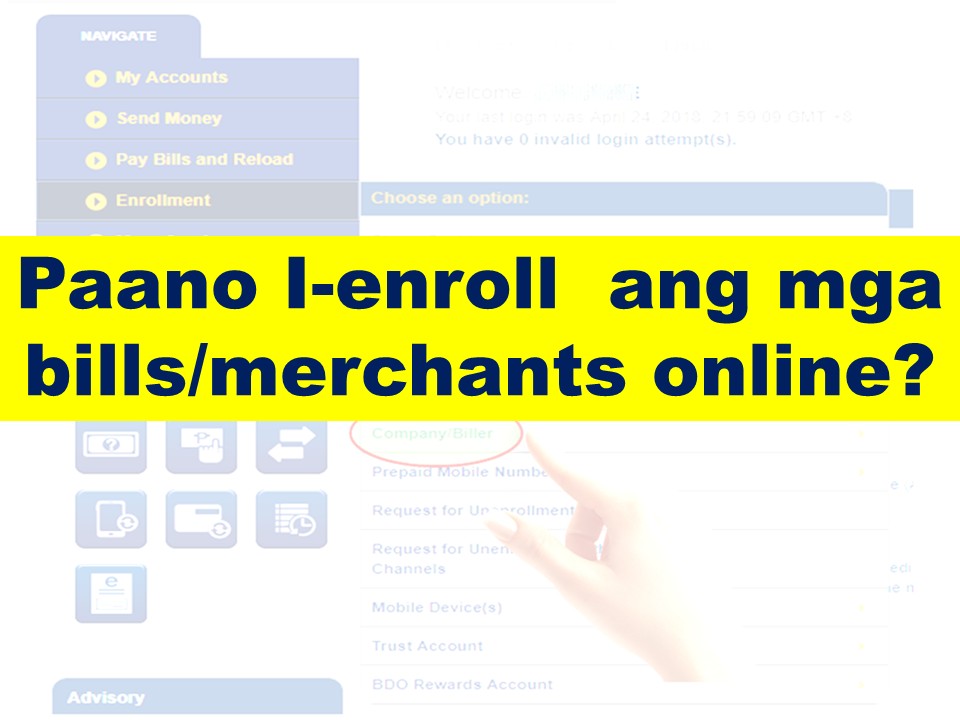
How do I enroll bills/merchants online? 
Do you have a BDO Account? Do you know that you can use it to pay your utility bills, credit card, loan amortizations and more?  Whether you want to pay your electric, telephone or water bill, you can now do it in the convenience of your own home. All you need is a working computer or a smartphone where you can have an internet access.  Advertisement         Sponsored Links        Which bills/merchants can I pay online?   There are over 300 billers you can pay through BDO Online Banking.     You can select from a complete list displayed in the drop-down menu located in the Bills Payment screen.        The cut-off time for immediate Bills Payments is 10pm.   All transactions made after the cut-off time and during weekends and holidays are subject to verification and will be considered transactions for the next banking day.       How do I enroll bills/merchants online?      To enroll a bill, select: Enrollment Services > Company/Biller > Enroll Enter the account number indicated in the bill as the subscriber number.   You can immediately pay your bills after enrollment.   The cut-off time for immediate Bills Payments is 10pm.   All transactions made after the cut-off time and during weekends and holidays are subject to verification and will be considered transactions for the next banking day.       How do I enroll my Meralco bill online?       To enroll Meralco, select: Enrollment Services > Company/Biller >           Enroll > Meralco       Enter the first 11 digits of the ATM/Phone Reference Number as the subscriber number. This is found in the lower left portion of your billing statement.         How do I pay Meralco bills?   Select Meralco in the drop-down list for "Pay this company/biller".      Enter the last 5 digits of the ATM/Phone Reference Number found on the lower left portion of your billing statement. Fill out the form and submit.       Note: System only accepts Meralco payments on or before the due date.       How do I pay billers/merchants that are not enrolled?     Click on "Pay a company/biller that is not yet enrolled".     Select any biller in the drop-down list after "Company/biller not requiring enrollment".   Enter the account number indicated on your billing statement as the subscriber number.   Fill out the form and submit.   You may also save this biller as an enrolled biller by Clicking on "Conforme".       How do I pay E-CENSUS (UNISYS) bills?     Select "E-CENSUS (UNISYS)" in your list of billers in the drop-down list for "Pay this company/biller".   This biller does not require enrollment.     Take note of the following when paying this biller:     1.) Enter the Total Amount Due when you are paying for all requests in a batch   2.) Enter the Amount Due to the request when you are paying for a particular request only   3.) Enter the Batch Request Number or Request Reference Number as the Subscriber No.   4.) Enter the Batch Request Number when you are paying for all requests in a batch   5.) Enter the Request Reference Number when you are paying for a particular request only     *Prior to confirming your payment, double-check the amount and the Subscriber Number that you entered against the e-Census document (Acknowledgement page/email/printout).    READ MORE: AFP Personnel To Get MRT Free Ride Starting April 25; Workers On Labor Day    Recruiters With Delisted, Banned, Suspended, Revoked And Cancelled POEA Licenses 2018    List of Philippine Embassies And Consulates Around The World    Classic Room Mates You Probably Living With   Do Not Be Fooled By Your Recruitment Agencies, Know Your  Correct Fees    Remittance Fees To Be Imposed On Kuwait Expats Expected To Bring $230 Million Income    TESDA Provides Training For Returning OFWs   Cash Aid To Be Given To Displaced OFWs From Kuwait—OWWA    Former OFW In Dubai Now Earning P25K A Week From Her Business    Top Search Engines In The Philippines For Finding Jobs Abroad    5 Signs A Person Is Going To Be Poor And 5 Signs You Are Going To Be Rich

To enroll a bill, select: Enrollment Services > Company/Biller > Enroll Enter the account number indicated in the bill as the subscriber number. 
You can immediately pay your bills after enrollment.
 The cut-off time for immediate Bills Payments is 10pm. 
All transactions made after the cut-off time and during weekends and holidays are subject to verification and will be considered transactions for the next banking day. 
Do you have a BDO Account? Do you know that you can use it to pay your utility bills, credit card, loan amortizations and more?  Whether you want to pay your electric, telephone or water bill, you can now do it in the convenience of your own home. All you need is a working computer or a smartphone where you can have an internet access.  Advertisement         Sponsored Links        Which bills/merchants can I pay online?   There are over 300 billers you can pay through BDO Online Banking.     You can select from a complete list displayed in the drop-down menu located in the Bills Payment screen.        The cut-off time for immediate Bills Payments is 10pm.   All transactions made after the cut-off time and during weekends and holidays are subject to verification and will be considered transactions for the next banking day.       How do I enroll bills/merchants online?      To enroll a bill, select: Enrollment Services > Company/Biller > Enroll Enter the account number indicated in the bill as the subscriber number.   You can immediately pay your bills after enrollment.   The cut-off time for immediate Bills Payments is 10pm.   All transactions made after the cut-off time and during weekends and holidays are subject to verification and will be considered transactions for the next banking day.       How do I enroll my Meralco bill online?       To enroll Meralco, select: Enrollment Services > Company/Biller >           Enroll > Meralco       Enter the first 11 digits of the ATM/Phone Reference Number as the subscriber number. This is found in the lower left portion of your billing statement.         How do I pay Meralco bills?   Select Meralco in the drop-down list for "Pay this company/biller".      Enter the last 5 digits of the ATM/Phone Reference Number found on the lower left portion of your billing statement. Fill out the form and submit.       Note: System only accepts Meralco payments on or before the due date.       How do I pay billers/merchants that are not enrolled?     Click on "Pay a company/biller that is not yet enrolled".     Select any biller in the drop-down list after "Company/biller not requiring enrollment".   Enter the account number indicated on your billing statement as the subscriber number.   Fill out the form and submit.   You may also save this biller as an enrolled biller by Clicking on "Conforme".       How do I pay E-CENSUS (UNISYS) bills?     Select "E-CENSUS (UNISYS)" in your list of billers in the drop-down list for "Pay this company/biller".   This biller does not require enrollment.     Take note of the following when paying this biller:     1.) Enter the Total Amount Due when you are paying for all requests in a batch   2.) Enter the Amount Due to the request when you are paying for a particular request only   3.) Enter the Batch Request Number or Request Reference Number as the Subscriber No.   4.) Enter the Batch Request Number when you are paying for all requests in a batch   5.) Enter the Request Reference Number when you are paying for a particular request only     *Prior to confirming your payment, double-check the amount and the Subscriber Number that you entered against the e-Census document (Acknowledgement page/email/printout).    READ MORE: AFP Personnel To Get MRT Free Ride Starting April 25; Workers On Labor Day    Recruiters With Delisted, Banned, Suspended, Revoked And Cancelled POEA Licenses 2018    List of Philippine Embassies And Consulates Around The World    Classic Room Mates You Probably Living With   Do Not Be Fooled By Your Recruitment Agencies, Know Your  Correct Fees    Remittance Fees To Be Imposed On Kuwait Expats Expected To Bring $230 Million Income    TESDA Provides Training For Returning OFWs   Cash Aid To Be Given To Displaced OFWs From Kuwait—OWWA    Former OFW In Dubai Now Earning P25K A Week From Her Business    Top Search Engines In The Philippines For Finding Jobs Abroad    5 Signs A Person Is Going To Be Poor And 5 Signs You Are Going To Be Rich

How do I enroll my Meralco bill online? 

Do you have a BDO Account? Do you know that you can use it to pay your utility bills, credit card, loan amortizations and more?  Whether you want to pay your electric, telephone or water bill, you can now do it in the convenience of your own home. All you need is a working computer or a smartphone where you can have an internet access.  Advertisement         Sponsored Links        Which bills/merchants can I pay online?   There are over 300 billers you can pay through BDO Online Banking.     You can select from a complete list displayed in the drop-down menu located in the Bills Payment screen.        The cut-off time for immediate Bills Payments is 10pm.   All transactions made after the cut-off time and during weekends and holidays are subject to verification and will be considered transactions for the next banking day.       How do I enroll bills/merchants online?      To enroll a bill, select: Enrollment Services > Company/Biller > Enroll Enter the account number indicated in the bill as the subscriber number.   You can immediately pay your bills after enrollment.   The cut-off time for immediate Bills Payments is 10pm.   All transactions made after the cut-off time and during weekends and holidays are subject to verification and will be considered transactions for the next banking day.       How do I enroll my Meralco bill online?       To enroll Meralco, select: Enrollment Services > Company/Biller >           Enroll > Meralco       Enter the first 11 digits of the ATM/Phone Reference Number as the subscriber number. This is found in the lower left portion of your billing statement.         How do I pay Meralco bills?   Select Meralco in the drop-down list for "Pay this company/biller".      Enter the last 5 digits of the ATM/Phone Reference Number found on the lower left portion of your billing statement. Fill out the form and submit.       Note: System only accepts Meralco payments on or before the due date.       How do I pay billers/merchants that are not enrolled?     Click on "Pay a company/biller that is not yet enrolled".     Select any biller in the drop-down list after "Company/biller not requiring enrollment".   Enter the account number indicated on your billing statement as the subscriber number.   Fill out the form and submit.   You may also save this biller as an enrolled biller by Clicking on "Conforme".       How do I pay E-CENSUS (UNISYS) bills?     Select "E-CENSUS (UNISYS)" in your list of billers in the drop-down list for "Pay this company/biller".   This biller does not require enrollment.     Take note of the following when paying this biller:     1.) Enter the Total Amount Due when you are paying for all requests in a batch   2.) Enter the Amount Due to the request when you are paying for a particular request only   3.) Enter the Batch Request Number or Request Reference Number as the Subscriber No.   4.) Enter the Batch Request Number when you are paying for all requests in a batch   5.) Enter the Request Reference Number when you are paying for a particular request only     *Prior to confirming your payment, double-check the amount and the Subscriber Number that you entered against the e-Census document (Acknowledgement page/email/printout).    READ MORE: AFP Personnel To Get MRT Free Ride Starting April 25; Workers On Labor Day    Recruiters With Delisted, Banned, Suspended, Revoked And Cancelled POEA Licenses 2018    List of Philippine Embassies And Consulates Around The World    Classic Room Mates You Probably Living With   Do Not Be Fooled By Your Recruitment Agencies, Know Your  Correct Fees    Remittance Fees To Be Imposed On Kuwait Expats Expected To Bring $230 Million Income    TESDA Provides Training For Returning OFWs   Cash Aid To Be Given To Displaced OFWs From Kuwait—OWWA    Former OFW In Dubai Now Earning P25K A Week From Her Business    Top Search Engines In The Philippines For Finding Jobs Abroad    5 Signs A Person Is Going To Be Poor And 5 Signs You Are Going To Be Rich
To enroll Meralco, select: Enrollment Services > Company/Biller > 


Do you have a BDO Account? Do you know that you can use it to pay your utility bills, credit card, loan amortizations and more?  Whether you want to pay your electric, telephone or water bill, you can now do it in the convenience of your own home. All you need is a working computer or a smartphone where you can have an internet access.  Advertisement         Sponsored Links        Which bills/merchants can I pay online?   There are over 300 billers you can pay through BDO Online Banking.     You can select from a complete list displayed in the drop-down menu located in the Bills Payment screen.        The cut-off time for immediate Bills Payments is 10pm.   All transactions made after the cut-off time and during weekends and holidays are subject to verification and will be considered transactions for the next banking day.       How do I enroll bills/merchants online?      To enroll a bill, select: Enrollment Services > Company/Biller > Enroll Enter the account number indicated in the bill as the subscriber number.   You can immediately pay your bills after enrollment.   The cut-off time for immediate Bills Payments is 10pm.   All transactions made after the cut-off time and during weekends and holidays are subject to verification and will be considered transactions for the next banking day.       How do I enroll my Meralco bill online?       To enroll Meralco, select: Enrollment Services > Company/Biller >           Enroll > Meralco       Enter the first 11 digits of the ATM/Phone Reference Number as the subscriber number. This is found in the lower left portion of your billing statement.         How do I pay Meralco bills?   Select Meralco in the drop-down list for "Pay this company/biller".      Enter the last 5 digits of the ATM/Phone Reference Number found on the lower left portion of your billing statement. Fill out the form and submit.       Note: System only accepts Meralco payments on or before the due date.       How do I pay billers/merchants that are not enrolled?     Click on "Pay a company/biller that is not yet enrolled".     Select any biller in the drop-down list after "Company/biller not requiring enrollment".   Enter the account number indicated on your billing statement as the subscriber number.   Fill out the form and submit.   You may also save this biller as an enrolled biller by Clicking on "Conforme".       How do I pay E-CENSUS (UNISYS) bills?     Select "E-CENSUS (UNISYS)" in your list of billers in the drop-down list for "Pay this company/biller".   This biller does not require enrollment.     Take note of the following when paying this biller:     1.) Enter the Total Amount Due when you are paying for all requests in a batch   2.) Enter the Amount Due to the request when you are paying for a particular request only   3.) Enter the Batch Request Number or Request Reference Number as the Subscriber No.   4.) Enter the Batch Request Number when you are paying for all requests in a batch   5.) Enter the Request Reference Number when you are paying for a particular request only     *Prior to confirming your payment, double-check the amount and the Subscriber Number that you entered against the e-Census document (Acknowledgement page/email/printout).    READ MORE: AFP Personnel To Get MRT Free Ride Starting April 25; Workers On Labor Day    Recruiters With Delisted, Banned, Suspended, Revoked And Cancelled POEA Licenses 2018    List of Philippine Embassies And Consulates Around The World    Classic Room Mates You Probably Living With   Do Not Be Fooled By Your Recruitment Agencies, Know Your  Correct Fees    Remittance Fees To Be Imposed On Kuwait Expats Expected To Bring $230 Million Income    TESDA Provides Training For Returning OFWs   Cash Aid To Be Given To Displaced OFWs From Kuwait—OWWA    Former OFW In Dubai Now Earning P25K A Week From Her Business    Top Search Engines In The Philippines For Finding Jobs Abroad    5 Signs A Person Is Going To Be Poor And 5 Signs You Are Going To Be Rich

Enroll > Meralco 
Do you have a BDO Account? Do you know that you can use it to pay your utility bills, credit card, loan amortizations and more?  Whether you want to pay your electric, telephone or water bill, you can now do it in the convenience of your own home. All you need is a working computer or a smartphone where you can have an internet access.  Advertisement         Sponsored Links        Which bills/merchants can I pay online?   There are over 300 billers you can pay through BDO Online Banking.     You can select from a complete list displayed in the drop-down menu located in the Bills Payment screen.        The cut-off time for immediate Bills Payments is 10pm.   All transactions made after the cut-off time and during weekends and holidays are subject to verification and will be considered transactions for the next banking day.       How do I enroll bills/merchants online?      To enroll a bill, select: Enrollment Services > Company/Biller > Enroll Enter the account number indicated in the bill as the subscriber number.   You can immediately pay your bills after enrollment.   The cut-off time for immediate Bills Payments is 10pm.   All transactions made after the cut-off time and during weekends and holidays are subject to verification and will be considered transactions for the next banking day.       How do I enroll my Meralco bill online?       To enroll Meralco, select: Enrollment Services > Company/Biller >           Enroll > Meralco       Enter the first 11 digits of the ATM/Phone Reference Number as the subscriber number. This is found in the lower left portion of your billing statement.         How do I pay Meralco bills?   Select Meralco in the drop-down list for "Pay this company/biller".      Enter the last 5 digits of the ATM/Phone Reference Number found on the lower left portion of your billing statement. Fill out the form and submit.       Note: System only accepts Meralco payments on or before the due date.       How do I pay billers/merchants that are not enrolled?     Click on "Pay a company/biller that is not yet enrolled".     Select any biller in the drop-down list after "Company/biller not requiring enrollment".   Enter the account number indicated on your billing statement as the subscriber number.   Fill out the form and submit.   You may also save this biller as an enrolled biller by Clicking on "Conforme".       How do I pay E-CENSUS (UNISYS) bills?     Select "E-CENSUS (UNISYS)" in your list of billers in the drop-down list for "Pay this company/biller".   This biller does not require enrollment.     Take note of the following when paying this biller:     1.) Enter the Total Amount Due when you are paying for all requests in a batch   2.) Enter the Amount Due to the request when you are paying for a particular request only   3.) Enter the Batch Request Number or Request Reference Number as the Subscriber No.   4.) Enter the Batch Request Number when you are paying for all requests in a batch   5.) Enter the Request Reference Number when you are paying for a particular request only     *Prior to confirming your payment, double-check the amount and the Subscriber Number that you entered against the e-Census document (Acknowledgement page/email/printout).    READ MORE: AFP Personnel To Get MRT Free Ride Starting April 25; Workers On Labor Day    Recruiters With Delisted, Banned, Suspended, Revoked And Cancelled POEA Licenses 2018    List of Philippine Embassies And Consulates Around The World    Classic Room Mates You Probably Living With   Do Not Be Fooled By Your Recruitment Agencies, Know Your  Correct Fees    Remittance Fees To Be Imposed On Kuwait Expats Expected To Bring $230 Million Income    TESDA Provides Training For Returning OFWs   Cash Aid To Be Given To Displaced OFWs From Kuwait—OWWA    Former OFW In Dubai Now Earning P25K A Week From Her Business    Top Search Engines In The Philippines For Finding Jobs Abroad    5 Signs A Person Is Going To Be Poor And 5 Signs You Are Going To Be Rich

Enter the first 11 digits of the ATM/Phone Reference Number as the subscriber number. This is found in the lower left portion of your billing statement. 


Do you have a BDO Account? Do you know that you can use it to pay your utility bills, credit card, loan amortizations and more?  Whether you want to pay your electric, telephone or water bill, you can now do it in the convenience of your own home. All you need is a working computer or a smartphone where you can have an internet access.  Advertisement         Sponsored Links        Which bills/merchants can I pay online?   There are over 300 billers you can pay through BDO Online Banking.     You can select from a complete list displayed in the drop-down menu located in the Bills Payment screen.        The cut-off time for immediate Bills Payments is 10pm.   All transactions made after the cut-off time and during weekends and holidays are subject to verification and will be considered transactions for the next banking day.       How do I enroll bills/merchants online?      To enroll a bill, select: Enrollment Services > Company/Biller > Enroll Enter the account number indicated in the bill as the subscriber number.   You can immediately pay your bills after enrollment.   The cut-off time for immediate Bills Payments is 10pm.   All transactions made after the cut-off time and during weekends and holidays are subject to verification and will be considered transactions for the next banking day.       How do I enroll my Meralco bill online?       To enroll Meralco, select: Enrollment Services > Company/Biller >           Enroll > Meralco       Enter the first 11 digits of the ATM/Phone Reference Number as the subscriber number. This is found in the lower left portion of your billing statement.         How do I pay Meralco bills?   Select Meralco in the drop-down list for "Pay this company/biller".      Enter the last 5 digits of the ATM/Phone Reference Number found on the lower left portion of your billing statement. Fill out the form and submit.       Note: System only accepts Meralco payments on or before the due date.       How do I pay billers/merchants that are not enrolled?     Click on "Pay a company/biller that is not yet enrolled".     Select any biller in the drop-down list after "Company/biller not requiring enrollment".   Enter the account number indicated on your billing statement as the subscriber number.   Fill out the form and submit.   You may also save this biller as an enrolled biller by Clicking on "Conforme".       How do I pay E-CENSUS (UNISYS) bills?     Select "E-CENSUS (UNISYS)" in your list of billers in the drop-down list for "Pay this company/biller".   This biller does not require enrollment.     Take note of the following when paying this biller:     1.) Enter the Total Amount Due when you are paying for all requests in a batch   2.) Enter the Amount Due to the request when you are paying for a particular request only   3.) Enter the Batch Request Number or Request Reference Number as the Subscriber No.   4.) Enter the Batch Request Number when you are paying for all requests in a batch   5.) Enter the Request Reference Number when you are paying for a particular request only     *Prior to confirming your payment, double-check the amount and the Subscriber Number that you entered against the e-Census document (Acknowledgement page/email/printout).    READ MORE: AFP Personnel To Get MRT Free Ride Starting April 25; Workers On Labor Day    Recruiters With Delisted, Banned, Suspended, Revoked And Cancelled POEA Licenses 2018    List of Philippine Embassies And Consulates Around The World    Classic Room Mates You Probably Living With   Do Not Be Fooled By Your Recruitment Agencies, Know Your  Correct Fees    Remittance Fees To Be Imposed On Kuwait Expats Expected To Bring $230 Million Income    TESDA Provides Training For Returning OFWs   Cash Aid To Be Given To Displaced OFWs From Kuwait—OWWA    Former OFW In Dubai Now Earning P25K A Week From Her Business    Top Search Engines In The Philippines For Finding Jobs Abroad    5 Signs A Person Is Going To Be Poor And 5 Signs You Are Going To Be Rich

How do I pay Meralco bills? 
Select Meralco in the drop-down list for "Pay this company/biller". 
Do you have a BDO Account? Do you know that you can use it to pay your utility bills, credit card, loan amortizations and more?  Whether you want to pay your electric, telephone or water bill, you can now do it in the convenience of your own home. All you need is a working computer or a smartphone where you can have an internet access.  Advertisement         Sponsored Links        Which bills/merchants can I pay online?   There are over 300 billers you can pay through BDO Online Banking.     You can select from a complete list displayed in the drop-down menu located in the Bills Payment screen.        The cut-off time for immediate Bills Payments is 10pm.   All transactions made after the cut-off time and during weekends and holidays are subject to verification and will be considered transactions for the next banking day.       How do I enroll bills/merchants online?      To enroll a bill, select: Enrollment Services > Company/Biller > Enroll Enter the account number indicated in the bill as the subscriber number.   You can immediately pay your bills after enrollment.   The cut-off time for immediate Bills Payments is 10pm.   All transactions made after the cut-off time and during weekends and holidays are subject to verification and will be considered transactions for the next banking day.       How do I enroll my Meralco bill online?       To enroll Meralco, select: Enrollment Services > Company/Biller >           Enroll > Meralco       Enter the first 11 digits of the ATM/Phone Reference Number as the subscriber number. This is found in the lower left portion of your billing statement.         How do I pay Meralco bills?   Select Meralco in the drop-down list for "Pay this company/biller".      Enter the last 5 digits of the ATM/Phone Reference Number found on the lower left portion of your billing statement. Fill out the form and submit.       Note: System only accepts Meralco payments on or before the due date.       How do I pay billers/merchants that are not enrolled?     Click on "Pay a company/biller that is not yet enrolled".     Select any biller in the drop-down list after "Company/biller not requiring enrollment".   Enter the account number indicated on your billing statement as the subscriber number.   Fill out the form and submit.   You may also save this biller as an enrolled biller by Clicking on "Conforme".       How do I pay E-CENSUS (UNISYS) bills?     Select "E-CENSUS (UNISYS)" in your list of billers in the drop-down list for "Pay this company/biller".   This biller does not require enrollment.     Take note of the following when paying this biller:     1.) Enter the Total Amount Due when you are paying for all requests in a batch   2.) Enter the Amount Due to the request when you are paying for a particular request only   3.) Enter the Batch Request Number or Request Reference Number as the Subscriber No.   4.) Enter the Batch Request Number when you are paying for all requests in a batch   5.) Enter the Request Reference Number when you are paying for a particular request only     *Prior to confirming your payment, double-check the amount and the Subscriber Number that you entered against the e-Census document (Acknowledgement page/email/printout).    READ MORE: AFP Personnel To Get MRT Free Ride Starting April 25; Workers On Labor Day    Recruiters With Delisted, Banned, Suspended, Revoked And Cancelled POEA Licenses 2018    List of Philippine Embassies And Consulates Around The World    Classic Room Mates You Probably Living With   Do Not Be Fooled By Your Recruitment Agencies, Know Your  Correct Fees    Remittance Fees To Be Imposed On Kuwait Expats Expected To Bring $230 Million Income    TESDA Provides Training For Returning OFWs   Cash Aid To Be Given To Displaced OFWs From Kuwait—OWWA    Former OFW In Dubai Now Earning P25K A Week From Her Business    Top Search Engines In The Philippines For Finding Jobs Abroad    5 Signs A Person Is Going To Be Poor And 5 Signs You Are Going To Be Rich

Enter the last 5 digits of the ATM/Phone Reference Number found on the lower left portion of your billing statement. Fill out the form and submit. 
Do you have a BDO Account? Do you know that you can use it to pay your utility bills, credit card, loan amortizations and more?  Whether you want to pay your electric, telephone or water bill, you can now do it in the convenience of your own home. All you need is a working computer or a smartphone where you can have an internet access.  Advertisement         Sponsored Links        Which bills/merchants can I pay online?   There are over 300 billers you can pay through BDO Online Banking.     You can select from a complete list displayed in the drop-down menu located in the Bills Payment screen.        The cut-off time for immediate Bills Payments is 10pm.   All transactions made after the cut-off time and during weekends and holidays are subject to verification and will be considered transactions for the next banking day.       How do I enroll bills/merchants online?      To enroll a bill, select: Enrollment Services > Company/Biller > Enroll Enter the account number indicated in the bill as the subscriber number.   You can immediately pay your bills after enrollment.   The cut-off time for immediate Bills Payments is 10pm.   All transactions made after the cut-off time and during weekends and holidays are subject to verification and will be considered transactions for the next banking day.       How do I enroll my Meralco bill online?       To enroll Meralco, select: Enrollment Services > Company/Biller >           Enroll > Meralco       Enter the first 11 digits of the ATM/Phone Reference Number as the subscriber number. This is found in the lower left portion of your billing statement.         How do I pay Meralco bills?   Select Meralco in the drop-down list for "Pay this company/biller".      Enter the last 5 digits of the ATM/Phone Reference Number found on the lower left portion of your billing statement. Fill out the form and submit.       Note: System only accepts Meralco payments on or before the due date.       How do I pay billers/merchants that are not enrolled?     Click on "Pay a company/biller that is not yet enrolled".     Select any biller in the drop-down list after "Company/biller not requiring enrollment".   Enter the account number indicated on your billing statement as the subscriber number.   Fill out the form and submit.   You may also save this biller as an enrolled biller by Clicking on "Conforme".       How do I pay E-CENSUS (UNISYS) bills?     Select "E-CENSUS (UNISYS)" in your list of billers in the drop-down list for "Pay this company/biller".   This biller does not require enrollment.     Take note of the following when paying this biller:     1.) Enter the Total Amount Due when you are paying for all requests in a batch   2.) Enter the Amount Due to the request when you are paying for a particular request only   3.) Enter the Batch Request Number or Request Reference Number as the Subscriber No.   4.) Enter the Batch Request Number when you are paying for all requests in a batch   5.) Enter the Request Reference Number when you are paying for a particular request only     *Prior to confirming your payment, double-check the amount and the Subscriber Number that you entered against the e-Census document (Acknowledgement page/email/printout).    READ MORE: AFP Personnel To Get MRT Free Ride Starting April 25; Workers On Labor Day    Recruiters With Delisted, Banned, Suspended, Revoked And Cancelled POEA Licenses 2018    List of Philippine Embassies And Consulates Around The World    Classic Room Mates You Probably Living With   Do Not Be Fooled By Your Recruitment Agencies, Know Your  Correct Fees    Remittance Fees To Be Imposed On Kuwait Expats Expected To Bring $230 Million Income    TESDA Provides Training For Returning OFWs   Cash Aid To Be Given To Displaced OFWs From Kuwait—OWWA    Former OFW In Dubai Now Earning P25K A Week From Her Business    Top Search Engines In The Philippines For Finding Jobs Abroad    5 Signs A Person Is Going To Be Poor And 5 Signs You Are Going To Be Rich

Note: System only accepts Meralco payments on or before the due date.
Do you have a BDO Account? Do you know that you can use it to pay your utility bills, credit card, loan amortizations and more?  Whether you want to pay your electric, telephone or water bill, you can now do it in the convenience of your own home. All you need is a working computer or a smartphone where you can have an internet access.  Advertisement         Sponsored Links        Which bills/merchants can I pay online?   There are over 300 billers you can pay through BDO Online Banking.     You can select from a complete list displayed in the drop-down menu located in the Bills Payment screen.        The cut-off time for immediate Bills Payments is 10pm.   All transactions made after the cut-off time and during weekends and holidays are subject to verification and will be considered transactions for the next banking day.       How do I enroll bills/merchants online?      To enroll a bill, select: Enrollment Services > Company/Biller > Enroll Enter the account number indicated in the bill as the subscriber number.   You can immediately pay your bills after enrollment.   The cut-off time for immediate Bills Payments is 10pm.   All transactions made after the cut-off time and during weekends and holidays are subject to verification and will be considered transactions for the next banking day.       How do I enroll my Meralco bill online?       To enroll Meralco, select: Enrollment Services > Company/Biller >           Enroll > Meralco       Enter the first 11 digits of the ATM/Phone Reference Number as the subscriber number. This is found in the lower left portion of your billing statement.         How do I pay Meralco bills?   Select Meralco in the drop-down list for "Pay this company/biller".      Enter the last 5 digits of the ATM/Phone Reference Number found on the lower left portion of your billing statement. Fill out the form and submit.       Note: System only accepts Meralco payments on or before the due date.       How do I pay billers/merchants that are not enrolled?     Click on "Pay a company/biller that is not yet enrolled".     Select any biller in the drop-down list after "Company/biller not requiring enrollment".   Enter the account number indicated on your billing statement as the subscriber number.   Fill out the form and submit.   You may also save this biller as an enrolled biller by Clicking on "Conforme".       How do I pay E-CENSUS (UNISYS) bills?     Select "E-CENSUS (UNISYS)" in your list of billers in the drop-down list for "Pay this company/biller".   This biller does not require enrollment.     Take note of the following when paying this biller:     1.) Enter the Total Amount Due when you are paying for all requests in a batch   2.) Enter the Amount Due to the request when you are paying for a particular request only   3.) Enter the Batch Request Number or Request Reference Number as the Subscriber No.   4.) Enter the Batch Request Number when you are paying for all requests in a batch   5.) Enter the Request Reference Number when you are paying for a particular request only     *Prior to confirming your payment, double-check the amount and the Subscriber Number that you entered against the e-Census document (Acknowledgement page/email/printout).    READ MORE: AFP Personnel To Get MRT Free Ride Starting April 25; Workers On Labor Day    Recruiters With Delisted, Banned, Suspended, Revoked And Cancelled POEA Licenses 2018    List of Philippine Embassies And Consulates Around The World    Classic Room Mates You Probably Living With   Do Not Be Fooled By Your Recruitment Agencies, Know Your  Correct Fees    Remittance Fees To Be Imposed On Kuwait Expats Expected To Bring $230 Million Income    TESDA Provides Training For Returning OFWs   Cash Aid To Be Given To Displaced OFWs From Kuwait—OWWA    Former OFW In Dubai Now Earning P25K A Week From Her Business    Top Search Engines In The Philippines For Finding Jobs Abroad    5 Signs A Person Is Going To Be Poor And 5 Signs You Are Going To Be Rich

 How do I pay billers/merchants that are not enrolled? 

Click on "Pay a company/biller that is not yet enrolled". 

Select any biller in the drop-down list after "Company/biller not requiring enrollment". 
Enter the account number indicated on your billing statement as the subscriber number. 
Fill out the form and submit. 
You may also save this biller as an enrolled biller by Clicking on "Conforme". 
Do you have a BDO Account? Do you know that you can use it to pay your utility bills, credit card, loan amortizations and more?  Whether you want to pay your electric, telephone or water bill, you can now do it in the convenience of your own home. All you need is a working computer or a smartphone where you can have an internet access.  Advertisement         Sponsored Links        Which bills/merchants can I pay online?   There are over 300 billers you can pay through BDO Online Banking.     You can select from a complete list displayed in the drop-down menu located in the Bills Payment screen.        The cut-off time for immediate Bills Payments is 10pm.   All transactions made after the cut-off time and during weekends and holidays are subject to verification and will be considered transactions for the next banking day.       How do I enroll bills/merchants online?      To enroll a bill, select: Enrollment Services > Company/Biller > Enroll Enter the account number indicated in the bill as the subscriber number.   You can immediately pay your bills after enrollment.   The cut-off time for immediate Bills Payments is 10pm.   All transactions made after the cut-off time and during weekends and holidays are subject to verification and will be considered transactions for the next banking day.       How do I enroll my Meralco bill online?       To enroll Meralco, select: Enrollment Services > Company/Biller >           Enroll > Meralco       Enter the first 11 digits of the ATM/Phone Reference Number as the subscriber number. This is found in the lower left portion of your billing statement.         How do I pay Meralco bills?   Select Meralco in the drop-down list for "Pay this company/biller".      Enter the last 5 digits of the ATM/Phone Reference Number found on the lower left portion of your billing statement. Fill out the form and submit.       Note: System only accepts Meralco payments on or before the due date.       How do I pay billers/merchants that are not enrolled?     Click on "Pay a company/biller that is not yet enrolled".     Select any biller in the drop-down list after "Company/biller not requiring enrollment".   Enter the account number indicated on your billing statement as the subscriber number.   Fill out the form and submit.   You may also save this biller as an enrolled biller by Clicking on "Conforme".       How do I pay E-CENSUS (UNISYS) bills?     Select "E-CENSUS (UNISYS)" in your list of billers in the drop-down list for "Pay this company/biller".   This biller does not require enrollment.     Take note of the following when paying this biller:     1.) Enter the Total Amount Due when you are paying for all requests in a batch   2.) Enter the Amount Due to the request when you are paying for a particular request only   3.) Enter the Batch Request Number or Request Reference Number as the Subscriber No.   4.) Enter the Batch Request Number when you are paying for all requests in a batch   5.) Enter the Request Reference Number when you are paying for a particular request only     *Prior to confirming your payment, double-check the amount and the Subscriber Number that you entered against the e-Census document (Acknowledgement page/email/printout).    READ MORE: AFP Personnel To Get MRT Free Ride Starting April 25; Workers On Labor Day    Recruiters With Delisted, Banned, Suspended, Revoked And Cancelled POEA Licenses 2018    List of Philippine Embassies And Consulates Around The World    Classic Room Mates You Probably Living With   Do Not Be Fooled By Your Recruitment Agencies, Know Your  Correct Fees    Remittance Fees To Be Imposed On Kuwait Expats Expected To Bring $230 Million Income    TESDA Provides Training For Returning OFWs   Cash Aid To Be Given To Displaced OFWs From Kuwait—OWWA    Former OFW In Dubai Now Earning P25K A Week From Her Business    Top Search Engines In The Philippines For Finding Jobs Abroad    5 Signs A Person Is Going To Be Poor And 5 Signs You Are Going To Be Rich

How do I pay E-CENSUS (UNISYS) bills? 

Select "E-CENSUS (UNISYS)" in your list of billers in the drop-down list for "Pay this company/biller". 
This biller does not require enrollment. 

Take note of the following when paying this biller: 
Do you have a BDO Account? Do you know that you can use it to pay your utility bills, credit card, loan amortizations and more?  Whether you want to pay your electric, telephone or water bill, you can now do it in the convenience of your own home. All you need is a working computer or a smartphone where you can have an internet access.  Advertisement         Sponsored Links        Which bills/merchants can I pay online?   There are over 300 billers you can pay through BDO Online Banking.     You can select from a complete list displayed in the drop-down menu located in the Bills Payment screen.        The cut-off time for immediate Bills Payments is 10pm.   All transactions made after the cut-off time and during weekends and holidays are subject to verification and will be considered transactions for the next banking day.       How do I enroll bills/merchants online?      To enroll a bill, select: Enrollment Services > Company/Biller > Enroll Enter the account number indicated in the bill as the subscriber number.   You can immediately pay your bills after enrollment.   The cut-off time for immediate Bills Payments is 10pm.   All transactions made after the cut-off time and during weekends and holidays are subject to verification and will be considered transactions for the next banking day.       How do I enroll my Meralco bill online?       To enroll Meralco, select: Enrollment Services > Company/Biller >           Enroll > Meralco       Enter the first 11 digits of the ATM/Phone Reference Number as the subscriber number. This is found in the lower left portion of your billing statement.         How do I pay Meralco bills?   Select Meralco in the drop-down list for "Pay this company/biller".      Enter the last 5 digits of the ATM/Phone Reference Number found on the lower left portion of your billing statement. Fill out the form and submit.       Note: System only accepts Meralco payments on or before the due date.       How do I pay billers/merchants that are not enrolled?     Click on "Pay a company/biller that is not yet enrolled".     Select any biller in the drop-down list after "Company/biller not requiring enrollment".   Enter the account number indicated on your billing statement as the subscriber number.   Fill out the form and submit.   You may also save this biller as an enrolled biller by Clicking on "Conforme".       How do I pay E-CENSUS (UNISYS) bills?     Select "E-CENSUS (UNISYS)" in your list of billers in the drop-down list for "Pay this company/biller".   This biller does not require enrollment.     Take note of the following when paying this biller:     1.) Enter the Total Amount Due when you are paying for all requests in a batch   2.) Enter the Amount Due to the request when you are paying for a particular request only   3.) Enter the Batch Request Number or Request Reference Number as the Subscriber No.   4.) Enter the Batch Request Number when you are paying for all requests in a batch   5.) Enter the Request Reference Number when you are paying for a particular request only     *Prior to confirming your payment, double-check the amount and the Subscriber Number that you entered against the e-Census document (Acknowledgement page/email/printout).    READ MORE: AFP Personnel To Get MRT Free Ride Starting April 25; Workers On Labor Day    Recruiters With Delisted, Banned, Suspended, Revoked And Cancelled POEA Licenses 2018    List of Philippine Embassies And Consulates Around The World    Classic Room Mates You Probably Living With   Do Not Be Fooled By Your Recruitment Agencies, Know Your  Correct Fees    Remittance Fees To Be Imposed On Kuwait Expats Expected To Bring $230 Million Income    TESDA Provides Training For Returning OFWs   Cash Aid To Be Given To Displaced OFWs From Kuwait—OWWA    Former OFW In Dubai Now Earning P25K A Week From Her Business    Top Search Engines In The Philippines For Finding Jobs Abroad    5 Signs A Person Is Going To Be Poor And 5 Signs You Are Going To Be Rich
1.) Enter the Total Amount Due when you are paying for all requests in a batch 
2.) Enter the Amount Due to the request when you are paying for a particular request only 
3.) Enter the Batch Request Number or Request Reference Number as the Subscriber No. 
4.) Enter the Batch Request Number when you are paying for all requests in a batch 
5.) Enter the Request Reference Number when you are paying for a particular request only 

*Before confirming your payment, double-check the amount and the Subscriber Number that you entered against the e-Census document (Acknowledgement page/email/printout).


©2018 THOUGHTSKOTO